It is Friday at 4:50pm and a prospect finally says yes. You have spent two weeks chasing this person, the consult went well, and they are ready to start. You tell them you will “get everything over this weekend,” hang up, and feel good. Then Monday happens. You are buried in four other files, the agreement you meant to send never goes out, and by Wednesday the new client has gone quiet. When you finally reach them, the energy is gone. They want to “think about it.” You just lost a client you had already won.
That is not a closing problem. You closed. It is an intake problem, and it is the single most expensive leak in a small credit repair shop, because it wastes the hardest work you do: getting someone to say yes in the first place.
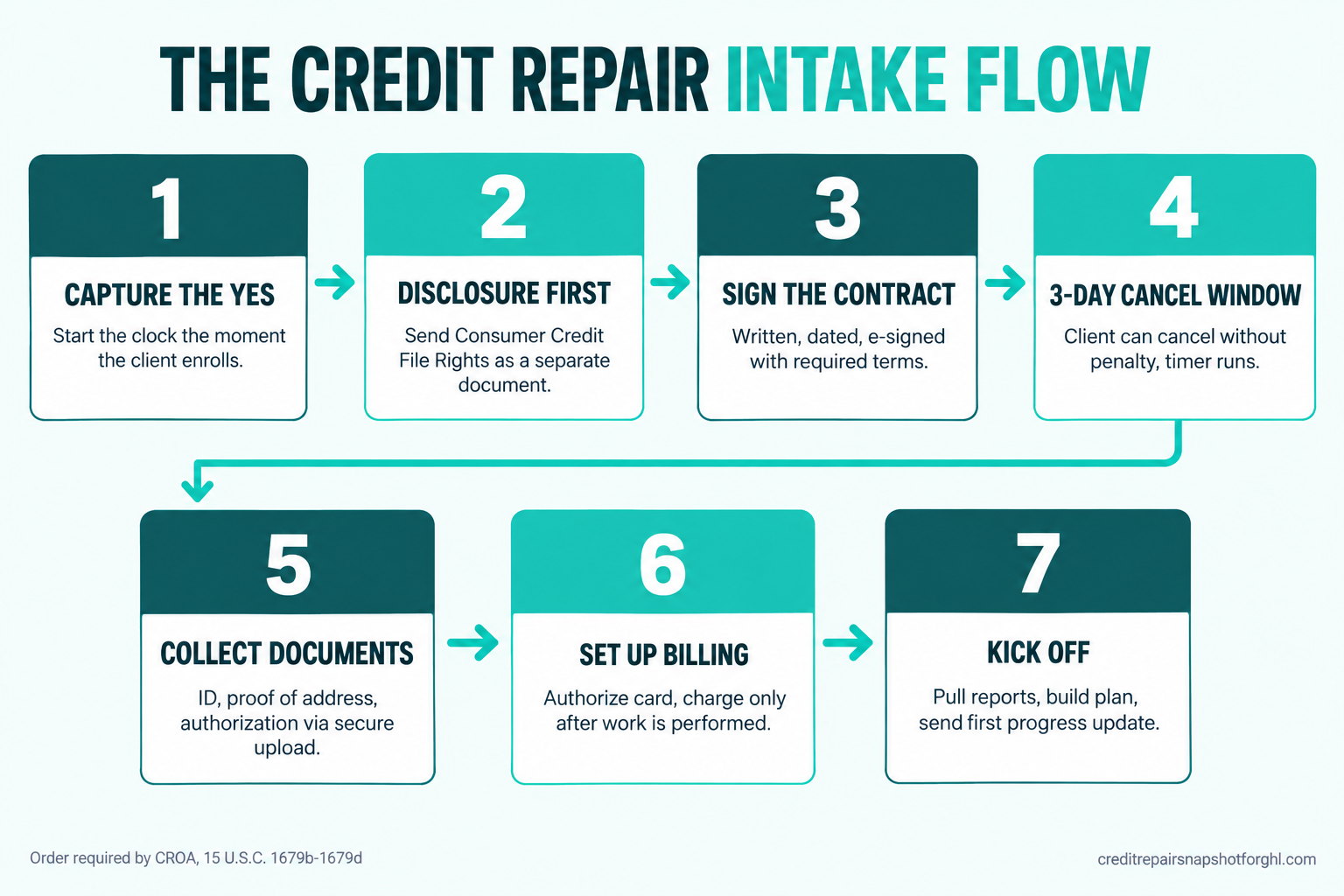
The answer up front: you do not need to hustle harder at enrollment. You need a fixed intake flow where every step has a trigger, an owner, and a compliance gate, so a “yes” becomes a signed, documented, billing-ready file within days instead of drifting back out the door. Build that flow once and two things happen at the same time. New clients stop slipping away in the gap between “yes” and “active,” and your CROA paperwork gets handled automatically instead of being something you hope you remembered.
One line before we start, because it matters all the way through: this is about operations, not outcomes. Nothing here disputes an item, decides what to dispute, or promises a credit result. The firm stays the credit repair organization. The system just runs the front door cleanly.
Table of contents
- Why credit repair clients vanish between “yes” and “active”
- What a broken intake actually costs you
- The CROA order of operations, in one picture
- Stage 1: Capture the yes and start the clock
- Stage 2: Deliver the disclosure, before anything is signed
- Stage 3: Send and e-sign the written contract
- Stage 4: Hold the three-business-day cancellation window
- Stage 5: Collect documents and ID securely
- Stage 6: Set up billing the way CROA allows
- Stage 7: Kick off and move to the active file
- Solo vs small team vs bigger shop
- Keeping the whole intake compliant
- Common objections
- FAQ
Why credit repair clients vanish between “yes” and “active”
A sale in credit repair is not one moment. It is a short process that starts with a verbal yes and ends when the client is a working file: agreement signed, documents in, first round planned, payment set up the right way. Every step in between is a chance for the client to slip, and the longer it drags, the more chances they get.
Why the gap is deadly is simple. When someone decides to buy, their motivation peaks on the call and falls from there. Every hour you take to send the next step, the prospect has more time to second-guess, to get busy, to talk to a friend who “heard credit repair is a scam.” You are not fighting a competitor at that point. You are fighting the client’s own cooling enthusiasm, and the clock is on their side.
Now stack the compliance load on top. Credit repair is not a business where you can fire over a Stripe link and start working. Federal law defines a credit repair organization broadly and wraps the whole enrollment in rules (15 U.S.C. §1679a): the client must receive a specific written disclosure before signing anything, the contract has required terms, there is a mandatory cancellation window, and you cannot take their money until you have done work. A solo operator running all of that from memory, between phone calls, on a Friday afternoon is going to drop a step. The only question is which one.
What a broken intake actually costs you
Start with the obvious cost: the client you already paid to acquire. You spent on the lead, spent your time on the consult, and won the yes. If they drift away during enrollment, every one of those costs is sunk and you have nothing to show for it. That is the most expensive kind of lost client there is, because it is the one who was ready.
Then there is the cash-flow cost unique to this niche. CROA bars you from charging for a service before it is fully performed (15 U.S.C. §1679b), so even a perfect enrollment has a built-in delay between signing a client and collecting real money, and a disputed round runs against the bureau’s 30-day reinvestigation clock (15 U.S.C. §1681i) before you have results to show. A slow, sloppy intake on top of that legally mandated wait stretches an already-long runway into a cash crunch. Fast, clean intake pulls your first billable work forward, which is the whole game when you cannot charge upfront.
The third cost only shows up when something goes wrong: a defective enrollment. Deliver the disclosure after the contract, skip it, or use a contract missing its required terms, and the whole engagement is built on a compliance error that a client dispute, a complaint, or a regulator will hand right back to you. A rushed intake and a compliant one look identical on a good day. The difference surfaces only on the bad one, which is exactly why you want the rules enforced by a system, not by whoever is least busy that afternoon.
The CROA order of operations, in one picture
Before the stage-by-stage walk-through, it helps to see the legal clocks you are working inside, because they define the shape of the whole flow. Three numbers run your intake and early engagement, and they come straight from the statutes, not from anyone’s opinion.
The statutory clocks that shape a credit repair intake and first round, in days. The 3-business-day cancellation right runs from contract signing; the 30-day reinvestigation window (extendable to 45 if the consumer sends relevant information mid-window) runs once a dispute reaches the bureau. Sources: 15 U.S.C. §1679d and 15 U.S.C. §1681i.
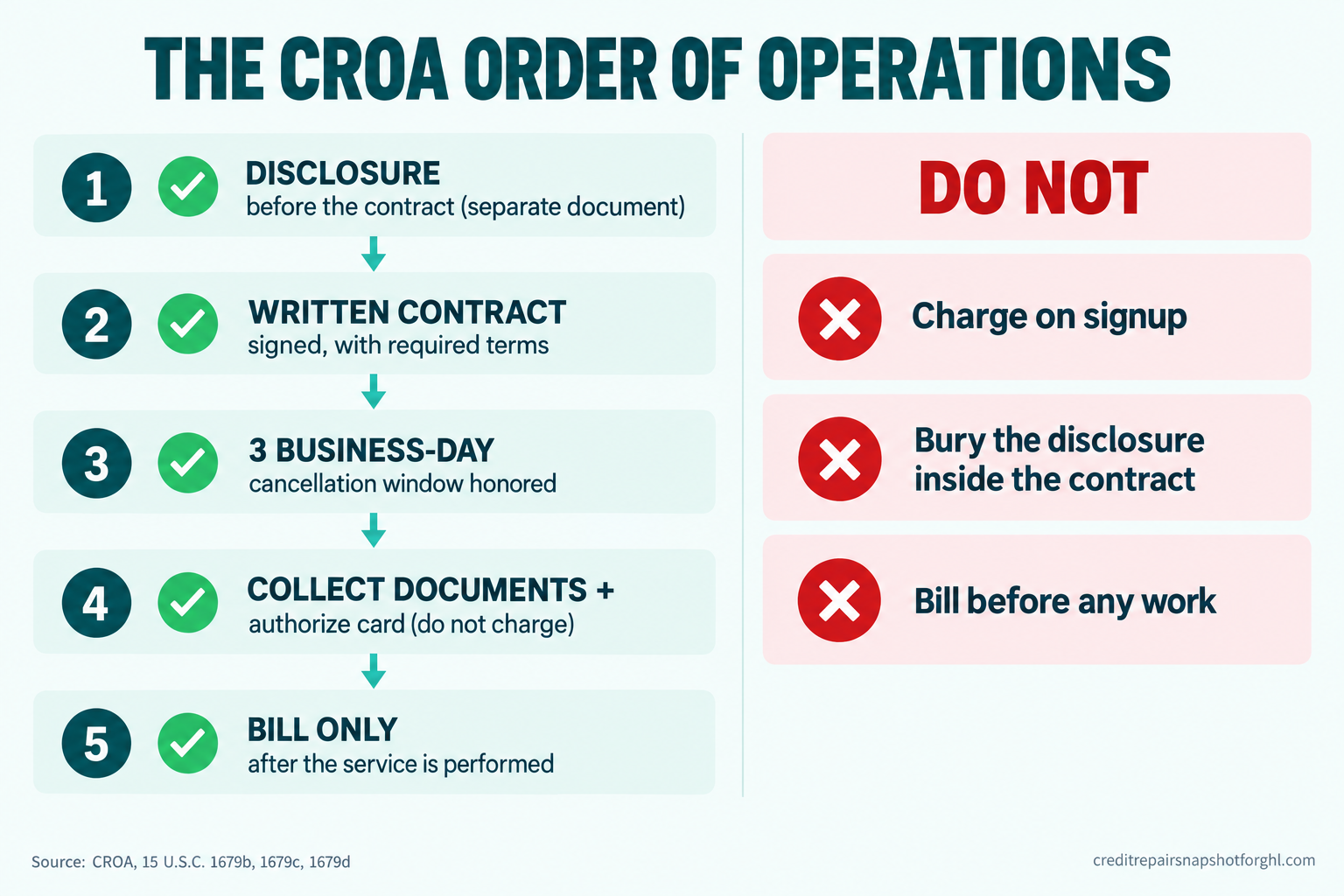
The order that keeps you compliant is fixed: disclosure first, then contract, then the cancellation window, then documents and billing setup, then work begins, then you can bill for what you performed. Every stage below slots into that order. Build the flow to match it and compliance stops being a separate task. It is just the shape of the pipeline.
Stage 1: Capture the yes and start the clock
What it is. The instant the prospect says yes, the enrollment begins. This stage exists to catch that moment and move on it before the energy fades, not to let it sit in your head as a thing to handle later.
The trigger that moves it. Marking the consult “enrolling” (a pipeline stage, a tag, a button) fires the first message immediately and queues the disclosure. The point is that the next step leaves without you having to remember to send it. A tidy, well-run consult sets this up, and a CROA-compliant sales script makes the handoff from pitch to paperwork feel natural instead of abrupt.
Steal this (the moment-of-yes text).
Hi {{first_name}}, great talking with you. I’m getting your enrollment started right now. In the next few minutes you’ll get an email from me with your Consumer Credit File Rights notice to read first, then your agreement to sign. Read the rights notice before you sign anything, that part matters. Reply here if you have any question at all. Reply STOP to opt out of texts.
How it breaks. You say “I’ll send it this weekend,” and the weekend eats it. With no trigger, the next step waits on you being free and remembering, and you are neither at 5pm on a Friday. Make the yes itself the trigger, so the first message and the disclosure leave while the client is still nodding.
Stage 2: Deliver the disclosure, before anything is signed
What it is. This is the step most rushed intakes get wrong, and it is non-negotiable. Before any contract is signed, the client must receive a separate written statement titled “Consumer Credit File Rights Under State and Federal Law,” and you must keep their signed acknowledgment that they got it for two years (15 U.S.C. §1679c).
The trigger that moves it. The enrollment stage from Stage 1 sends the disclosure as its own document, with its own acknowledgment to sign, and the system will not release the contract until that acknowledgment is recorded. That ordering is the whole point: the gate makes the compliant sequence the only sequence available.
The compliance gate it carries. Two things have to be true before you move on. The disclosure went out as a standalone document, not buried inside the contract, and the client’s dated acknowledgment is stored. If either is missing, the client does not advance. Full stop.
Steal this (the disclosure delivery message).
{{first_name}}, before your agreement, the law requires I give you this: your Consumer Credit File Rights. It explains what you can do yourself for free and your rights when working with a company like mine. Please open it, read it, and sign the short “I received this” acknowledgment at the bottom. As soon as that’s in, I’ll send your agreement.
How it breaks. The operator pastes the rights language into the contract to “save a step,” or signs the client up first and sends the disclosure “to have on file” afterward. Both invert the legal order. The statute says the disclosure comes first and stands alone, so a flow that cannot release the contract until the acknowledgment is logged beats any reminder note.
Stage 3: Send and e-sign the written contract
What it is. The formal agreement. CROA requires it to be written, dated, and signed by the client, and it has to include specific terms: the total of all payments, a detailed description of the services with an estimated completion date or length of time, your business name and principal address, and a conspicuous bold statement of the cancellation right placed near the signature (15 U.S.C. §1679d).
The trigger that moves it. The logged disclosure acknowledgment from Stage 2 releases the contract for e-signature. The client signs on their phone, the signed copy is stored automatically against their record, and the signing event starts the cancellation clock in Stage 4.
The compliance gate it carries. The contract template itself has to carry every required term every time, which is exactly the kind of thing that drifts when you copy last month’s Word doc and edit it by hand. A fixed template, filled from the client’s record, is how you stop a missing completion-date line from slipping through. If you are still assembling agreements manually, our CROA-compliant contract and 3-day cancellation walk-through breaks down what each required clause has to say.
Steal this (the e-sign request).
{{first_name}}, here’s your service agreement. Everything we discussed is in here: what I’ll be doing, the payment terms, and your right to cancel. Give it a read, and when you’re ready, sign right on your phone. Once it’s signed you’ll have three business days to change your mind for any reason, no penalty. Questions before you sign? Just reply.
How it breaks. Two classic failures: the contract goes out as a PDF the client has to print, sign, and scan, which kills momentum stone dead, or the template silently loses a required term over months of hand-editing. Generate the contract from a locked template tied to the client’s data, delivered for e-signature, and both problems disappear.
Stage 4: Hold the three-business-day cancellation window
What it is. CROA gives the client the right to cancel the contract without penalty or obligation until midnight of the third business day after signing (15 U.S.C. §1679d). This window is not a problem to hide from. It is a trust-builder you can lean into, and it decides when your billing can legally begin.
The trigger that moves it. The signature event starts a timer on the client’s record. During the window the client sits in a “pending” state. When the window closes clean, the record flips to “active” and the downstream steps (first billing eligibility, full kickoff) unlock. The timer does the counting so you never guess which day is day three.
The compliance gate it carries. Do not take money that you would have to refund, and do not behave as if the engagement is irreversible, during these three days. Tying “active” status to the clock keeps you from, say, running a first charge on day two that becomes a mess if the client cancels on day three.
Steal this (the confidence message during the window).
{{first_name}}, you’re all set and your file is open. Quick note: you’ve got until the end of the third business day to cancel for any reason with zero penalty, that’s your right and I want you to know it. I’m not going anywhere. While the window runs, go ahead and send over the documents in the next message so we’re ready to move the moment you’re confirmed.
How it breaks. Operators either forget the window and charge immediately, or treat it as a scary dead zone and go silent, letting the client cool off again. The flow does both jobs: it blocks premature billing and keeps the client warm with a message that frames the cancellation right as a feature, not a risk.
Stage 5: Collect documents and ID securely
What it is. The practical paperwork that turns a signed client into a workable file: a government ID, proof of address, and the authorizations you need to pull or monitor their report. This is where a lot of enrollments quietly stall because the client is “going to send it later.”
The trigger that moves it. The active status from Stage 4 (or the open-but-pending state during the window) fires a document request with a secure upload link and a short checklist. Each uploaded item checks itself off, and the system nudges on what is still missing instead of leaving you to chase manually.
The compliance gate it carries. Identity documents are sensitive. Collect them through a secure, access-controlled upload tied to the client’s record, never by text photo or open email. The clean way to do this is covered in our guide to collecting client documents securely, and a branded client portal makes the whole handoff feel professional rather than like a scavenger hunt.
Steal this (the document request).
{{first_name}}, last step before I can get to work: I need three things uploaded here (secure link): a photo of your ID, one proof of your current address (utility bill or lease), and your signed authorization so I can access your reports. The link is private to your file. Takes about five minutes on your phone. I’ll ping you if anything’s missing.
How it breaks. A plain “send me your ID” text with no link, no checklist, and no follow-up means half the clients send one item and forget the rest, and you chase documents for a week. A secure upload with a checklist that nudges on the missing piece collects in a day what manual chasing leaves half-finished.
Stage 6: Set up billing the way CROA allows
What it is. Getting the client’s payment method on file and the recurring plan configured, structured so the first charge happens only after you have performed, as the advance-fee rule requires (15 U.S.C. §1679b).
The trigger that moves it. Document collection completing moves the client to billing setup. The payment method is authorized and stored, but the billing schedule is wired to a work event (first round prepared and filed, or the service for the period performed) rather than to the signup date, so money moves only when the law allows.
The compliance gate it carries. Authorizing a card is not the same as charging it. You can capture the payment method during intake, but the charge itself has to wait until the service it pays for is performed. Keep that line bright. The mechanics of doing this without triggering disputes are in our piece on recurring billing without chargebacks.
Steal this (the billing setup message).
{{first_name}}, let’s get your billing set up so there’s nothing to think about later. Add your card on the secure link below. You won’t be charged today. Your first payment runs after the first round of work is done, the way the law requires, and you’ll get a receipt every month. Everything’s itemized so you always see exactly what you’re paying for.
How it breaks. The temptation is to charge on signup because cash is tight, which is exactly what CROA forbids. Or billing gets left as a “later” task and never wired at all, so the first month slips by unbilled. The flow captures the method now and releases the charge on the right event, protecting both compliance and cash flow.
Stage 7: Kick off and move to the active file
What it is. The moment intake ends and real work begins. The client has signed, cleared the window, uploaded documents, and set up billing. Now you pull reports, build the plan, file or prepare the first round, and send the first real progress update.
The trigger that moves it. Everything upstream being complete flips the client into your working caseload and fires a kickoff message. From here they leave the intake flow and enter the ongoing case-tracking pipeline that carries them through every dispute round.
The compliance gate it carries. Keep the division of labor clean from the first update onward. You report actions and effort, never outcomes. The system sends a progress note that a round was prepared or filed. It never promises a deletion or a score change, because that promise would break CROA and is not yours or the system’s to make.
Steal this (the kickoff message).
{{first_name}}, you’re officially active and I’m on it. I’ve pulled your reports and I’m building your plan now. Your first update with what we’re working on comes within the next few days. From here you’ll hear from me at every step, so you’re never left wondering what’s happening. Welcome aboard.
How it breaks. The client clears intake and hears nothing for two weeks because “work” happens in the background and nobody told them. Silence this early reads as “nothing is happening,” and a client who feels that at the start is already halfway to going quiet by month two. A kickoff message plus a scheduled first update closes that gap before it opens, which is exactly the handoff our client progress-update service is built for.
Solo vs small team vs bigger shop
The seven stages are the same at every size. What changes is who touches each one and how much you can hand off.
Solo operator (up to about 30 clients). You are every stage, so the flow’s job is to be your second pair of hands. Automate Stage 1’s instant message, the Stage 2 disclosure gate, the Stage 3 contract generation, the Stage 4 timer, the Stage 5 document nudges, and the Stage 6 billing wiring. That leaves you only the human parts: the consult and the Stage 7 plan. Done right, a Friday-afternoon yes is a fully enrolled, documented, billing-ready client by the time you sit down Monday, with you having sent exactly zero manual messages over the weekend.
Small team (roughly 30 to 100 clients). Now the stages become handoffs between people, and the flow is what makes delegation safe. A trained GoHighLevel VA can own Stages 1, 5, and 6 (the messaging, the document chase, the billing setup) while you keep the consult and the Stage 7 planning. Because every stage has a clear trigger and gate, a new hire can run intake without you explaining each client, and without the compliance order ever depending on their memory.
Bigger shop (100+ clients). At volume, intake is a conveyor you manage by watching where clients pile up, usually at documents, the one step that depends on the client doing something. You staff against that bottleneck, measure how long the average enrollment takes from yes to active, and drive that number down. This is also where a memory-based intake would have quietly produced a stack of defective enrollments months ago, which is why the compliance gates matter most exactly when you move fastest.
Keeping the whole intake compliant
Compliance in credit repair is mostly about doing things in the right order and being able to prove you did. A good intake flow gives you both for free, because the proof builds itself as the client moves through.
The order is the law. Disclosure as a separate document before the contract (§1679c), a written and signed contract with every required term (§1679d), the three-business-day cancellation right honored, and no charge before the service is performed (§1679b). A flow that physically enforces that sequence makes the compliant path the only path a client can take.
The texts have their own rulebook. Every message in this flow is a text or email to a consumer, and that brings the TCPA into play: autodialed or prerecorded calls and texts to a cell phone generally need prior express consent (47 U.S.C. §227), and every message should carry a clear opt-out. Credit repair messaging also runs into A2P 10DLC carrier registration, which is routinely rejected for this niche, so get that squared away before you lean on SMS. We cover the approval path in detail in getting A2P 10DLC approved for credit repair.
The audit trail writes itself. A regulator or a bank does not accept “I think we sent that.” A flow that timestamps the disclosure acknowledgment, the signed contract, the cancellation window, each document, and the billing authorization gives you a dated record of the entire enrollment without you assembling anything.
Keep the roles clean throughout. The system runs the sequence, the documents, and the communication. It never decides what to dispute, never implies a result, and never acts as the credit repair organization. That judgment and that responsibility stay with you and the firm.
Common objections
“I close fine, I don’t have an intake problem.” Closing and enrolling are different skills, and plenty of great closers leak clients in the 72 hours after the yes. The test is simple: of your last ten verbal yeses, how many were fully signed, documented, and billing-ready within three days? If the honest answer is not close to ten, the leak is at intake, not at the close.
“I already use dispute software, isn’t onboarding built in?” Dispute tools are built around the letters and the bureau workflow. The CROA-specific front door, the disclosure-before-contract gate, the e-signed agreement with required terms, the cancellation timer, the compliant billing trigger, usually sits outside them or is left to you to assemble. A CRM intake flow wraps that front door and hands clean clients to your dispute tool.
“Setting up all these automations sounds like a month of work.” Building it from scratch is a real project, which is the whole reason a prebuilt flow exists. The stages, gates, templates, and messages come wired for credit repair, so you adopt a working intake instead of designing one between client calls. You spend your time on consults and plans, not on configuring triggers.
“Won’t automated enrollment feel cold and impersonal?” It feels like a business that has its act together, which is reassuring to someone about to trust you with their financial life. The automation handles the reliable parts (sending the disclosure, releasing the contract, nudging for documents) so your human attention goes where it counts: the consult, the plan, and any real question the client has. Fast and organized beats warm and forgotten every time.
Friday at 4:50pm, rebuilt
Go back to that Friday yes. This time you tap one button to mark the consult “enrolling,” and you go home. The client gets the welcome text within the minute, reads and acknowledges their rights disclosure that evening, signs the agreement on their phone Saturday morning, and uploads their ID and proof of address from the couch Saturday afternoon. The cancellation timer runs quietly over the weekend. Their card is on file, authorized but not charged. Monday morning you open your board and the client is sitting in “ready for kickoff,” fully documented and compliant, waiting for the one thing only you can do: pull the reports and build the plan.
No lost weekend. No dropped disclosure. No client who went cold because you got busy. The intake ran itself inside the rules, and you got back the most valuable thing a solo operator has: the stretch of attention between winning a client and serving one. That is the difference between a shop that leaks its hardest-won clients and one that turns every yes into a working file.
Frequently asked questions
What is the correct order to onboard a credit repair client under CROA?
Deliver the 'Consumer Credit File Rights Under State and Federal Law' statement as a separate document and get a signed acknowledgment before any contract is signed (15 U.S.C. §1679c); then have the client sign a written, dated contract that includes the required terms (§1679d); honor the three-business-day cancellation right; collect documents; and only charge after the service is performed (§1679b).
Can I charge a credit repair client when they sign up?
No. CROA prohibits charging or receiving any money for a service before that service is fully performed (15 U.S.C. §1679b). You can authorize and store a payment method during intake, but the first charge must wait until you have actually performed the work it pays for. This is why a compliant intake flow wires billing to a work event, not to the signup date, and it is the single rule that makes credit repair cash flow different from a normal subscription.
How long does the client have to cancel the contract?
Until midnight of the third business day after signing, without penalty or obligation (15 U.S.C. §1679d). The contract must state this right conspicuously, in bold, near the signature line. A good intake flow starts a timer at signing, holds the client in a 'pending' state during the window, and only flips them to fully active (and billing-eligible) once the window closes.
What documents do I need to collect during credit repair onboarding?
At minimum a government-issued photo ID, a proof of current address (a utility bill or lease), and the client's signed authorization to access and monitor their credit reports. Because these are sensitive identity documents, collect them through a secure, access-controlled upload tied to the client's record, not by text photo or open email. A checklist that nudges on the missing item collects in a day what manual chasing stretches across a week.
Do the texts and emails in my onboarding flow have compliance rules too?
Yes. Messaging consumers brings in the TCPA, which generally requires prior express consent for autodialed or prerecorded calls and texts to a cell phone (47 U.S.C. §227), and every message should include a clear opt-out. Credit repair SMS also has to clear A2P 10DLC carrier registration, which is frequently rejected for this niche, so register before you rely on texting during intake.
Does this replace my dispute software or my CRM?
It is the intake layer that sits in front of them. The flow handles the CROA-specific front door, the disclosure gate, the e-signed contract, the cancellation timer, document collection, and compliant billing setup, then hands a clean, documented client to your dispute tool and your ongoing case pipeline. It complements dispute software rather than replacing it, covering the enrollment steps those tools usually leave to you.
How fast should onboarding be?
Fast enough that the client never cools off, which in practice means a signed, documented, billing-ready file within about three days of the yes, not three weeks. The limiting factor is usually how quickly the client uploads documents, so the biggest speed lever is making document collection effortless with a secure link and a self-checking checklist. Automating the disclosure, contract, and billing steps removes the delays that are under your control.