It is Tuesday afternoon and a client texts you: “Any update on my file?” You know the name. You think they are in round two. You open the spreadsheet, scroll past forty other rows, and the cell where you track their last letter date is blank because you were on the phone the day you meant to fill it in. You check your sent mail. You check the folder of PDFs. Ten minutes later you still are not sure whether that client’s thirty-day window closed last week or closes next week, and you have four more messages like this waiting.
That is not a you problem. It is a system problem, and every credit repair operator hits it at the same place: the point where the caseload grows past what one person can hold in their head.
The answer up front: you do not need to work harder or remember better. You need a pipeline, a single place where every client sits in exactly one named stage, each stage carries its own deadline and its own next action, and the system moves people forward and nudges you the moment something is due. Build that once and “losing track” stops being possible, because the track is no longer in your memory. It is in front of you.
One line before we start: this is about operations, not credit outcomes. Nothing here disputes an item, decides what to dispute, or promises a score change. That stays with you, the firm, and inside the law.
Table of contents
- Why a credit repair caseload breaks a spreadsheet
- What losing track actually costs you
- The client pipeline, stage by stage
- Stage 1: New lead to booked consult
- Stage 2: Enrollment, signed and logged
- Stage 3: Reports pulled, plan built
- Stage 4: Round one filed and the 30-day clock
- Stage 5: Results in, next move decided
- Stage 6: Keep the client informed
- Stage 7: Graduate the client cleanly
- Solo vs small team vs bigger shop
- Keeping the tracking compliant
- Common objections
- FAQ
Why a credit repair caseload breaks a spreadsheet
A spreadsheet is a grid of cells. It is brilliant for a static list and terrible for anything that moves on a clock, which is exactly what a credit repair caseload is. Every client is a small process with timers running: a thirty-day reinvestigation window, a date the next round goes out, a monitoring check, a payment that bills monthly. A grid does not know any of that. It just sits there until you remember to update it, and the day you forget, the data is silently wrong.
That silent-wrongness is the real danger. Research on real-world spreadsheets is brutal: recent field audits using solid methods found errors in at least 86% of the spreadsheets they examined (Panko, arXiv). Those were built by businesses that cared about getting them right. Yours is being updated between phone calls, so it is worse, not better. And unlike a budget error, a tracking error in credit repair means a real person’s case stalls while you think it is moving.
Share of audited real-world spreadsheets found to contain errors. The better the audit method, the more errors it finds, and recent audits catch errors in at least 86% of spreadsheets. A dispute caseload is harder to keep clean than the budgets these audits examined. Source: Ray Panko, “Spreadsheet Errors: What We Know. What We Think We Can Do,” arXiv.
The second problem is that the spreadsheet is never the only place. The client’s reports live on a monitoring site, their messages in your inbox, their signed agreement in a cloud folder, their payment in your processor. So “checking on a client” means jumping between four or five tabs and reassembling the picture from scratch every time. That jumping has a measured cost, and it is not small.
What losing track actually costs you
Start with your week. The average worker loses just under four hours a week, roughly 9% of all work time, simply re-orienting after switching between applications, toggling nearly 1,200 times a day (Harvard Business Review, 2022). A credit repair operator with no single source of truth lives in that number. Every “quick check” is a tab hunt. Four hours a week is half a working day gone to friction, not work.
Then there is the cost you cannot see until it bites: the missed deadline. A credit bureau must complete a reinvestigation within 30 days of receiving a dispute (15 U.S.C. §1681i). When results come back, that is your cue to review, update the client, and file the next round. If you do not know who is mid-window and who just hit day 30, results sit unworked, rounds go out late, and cases that should take six months drag toward ten. The client feels the drift long before you do, and drift is how clients start going quiet around month two.
The third cost is the one that keeps operators up at night without a name for it: you cannot prove what you did. If a client disputes a charge, files a complaint, or a state regulator asks questions, you need to show the signed contract, the disclosure you delivered, the date the cancellation window opened, and every action you took and when. A spreadsheet with half-filled cells is not that record. A system that logs each step as it happens is.
The client pipeline, stage by stage
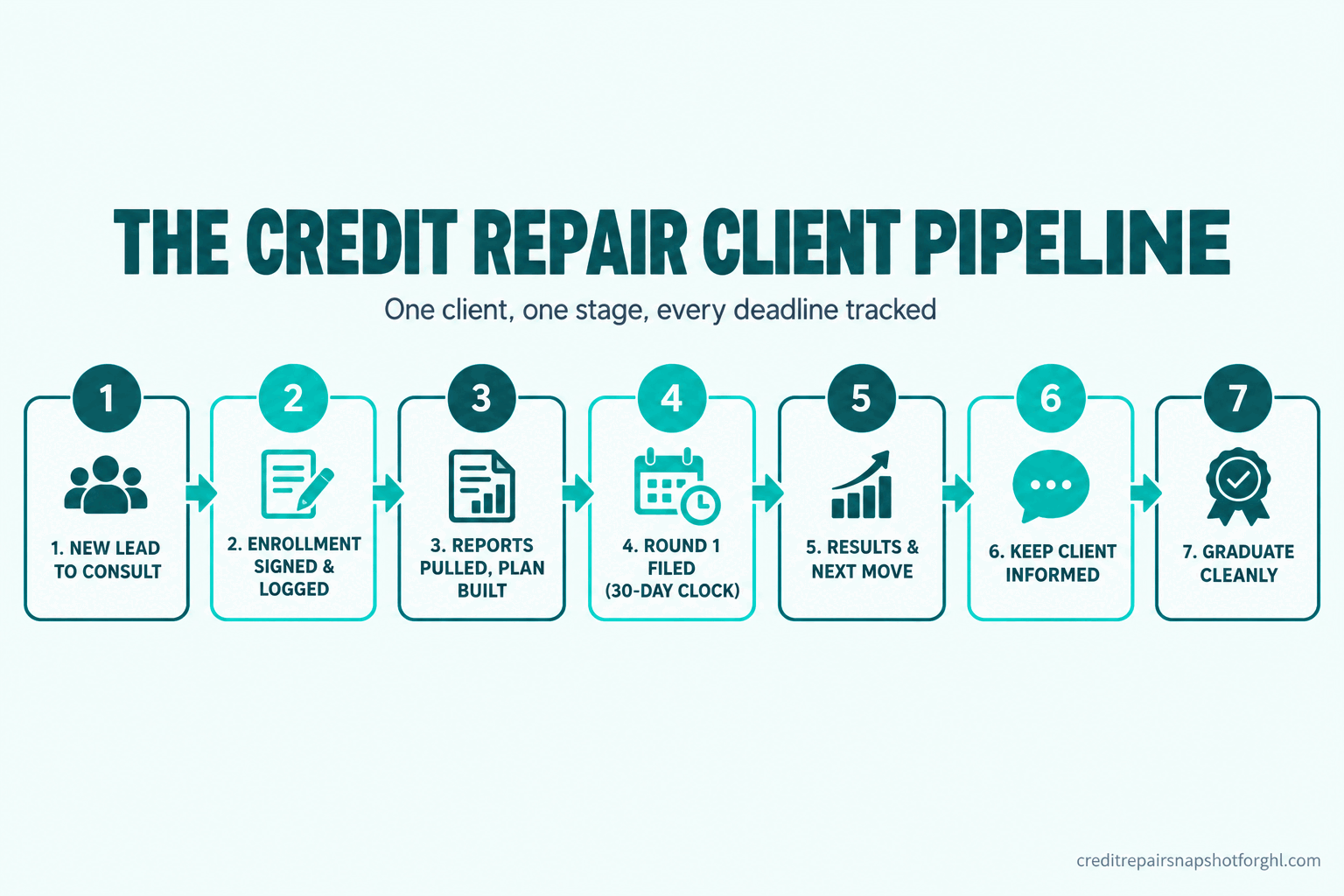
Here is the whole thing: seven stages every client moves through, from the first inquiry to a clean exit. Each stage is a named status in one pipeline. Each carries one clear “done” condition that moves the client forward, one deadline, and one set of actions the system handles for you. You can build this inside GoHighLevel, the platform our own system runs on, or any CRM that does pipelines, two-way messaging, and workflow automation. The point is not the tool. The point is that a client is always in exactly one stage, and you can see all of them at a glance.
| Stage | On a spreadsheet it breaks when | As a pipeline stage it |
|---|---|---|
| 1. New lead → consult | a lead sits with no follow-up and goes cold | auto-nurtures until booked, then moves itself |
| 2. Enrollment | the signed contract and 3-day log live in scattered folders | captures and timestamps every compliance doc |
| 3. Reports & plan | you forget who you have pulled reports for | flags the client the day reports are in |
| 4. Round 1 filed | the 30-day clock lives only in your head | starts a timer and surfaces the review date |
| 5. Results & next move | results come back and sit unworked | drops the client into a “needs action” view |
| 6. Keep informed | updates are manual, so they stop | fires progress touches on status change |
| 7. Graduate | finished clients just drift off | triggers the review ask and referral invite |
The thread through all seven: the stage is the truth. Move a client to the next stage and the right things happen automatically. Leave them in a stage past its deadline and the system shows you, in red, before the client has to ask.
Stage 1: New lead to booked consult
What it is. The front of the pipeline, where an inquiry becomes a booked consultation. Every lead enters here with a source tag and a timestamp.
The trigger that moves it. A booked consult moves the client to Stage 2 automatically. Until then, the lead sits in a nurture: a fast first reply, then spaced reminders to book, so nobody falls through on day one.
The deadline it carries. Speed. A lead you answer in minutes books far more often than one you reach tomorrow, so the first touch fires the instant the lead arrives, not when you next check your phone.
How it breaks on a spreadsheet. New leads get typed into a row, if you remember, and then compete with forty existing clients for your attention. The follow-up that turns a lead into a consult never happens, and you blame your ad spend when the real leak is that nobody followed up. A pipeline stage with an automatic nurture closes that leak without you touching it.
Stage 2: Enrollment, signed and logged
What it is. The client says yes, and you turn that yes into a compliant, documented enrollment. This is the single most important stage to get out of your memory and into a system, because it is where the law lives.
The trigger that moves it. The client is not enrolled until the agreement is signed, the required disclosure is delivered, and the three-day cancellation window is logged. When all three are captured, the client moves to Stage 3.
The deadline it carries. The three-business-day cancellation right (15 U.S.C. §1679e). Your system should record when it opened and not let real dispute work start until it closes.
Steal this (the enrollment checklist, as pipeline sub-tasks).
- Written contract signed and stored, dated (§1679d)
- “Consumer Credit File Rights” disclosure delivered and acknowledged, dated (§1679c)
- Three-day cancellation window opened (timestamp logged)
- Billing authorization captured, first charge scheduled after work begins (§1679b)
- Welcome sequence triggered, expectations set
How it breaks on a spreadsheet. The contract is in a cloud folder, the disclosure is a PDF you emailed, the cancellation date is nowhere, and the billing lives in your processor. Reassembling that for one client takes ten minutes. Producing it for forty under a deadline is impossible. The full version of this lives in the CROA-compliant onboarding checklist.
Stage 3: Reports pulled, plan built
What it is. You pull the client’s reports, review them, and build the dispute plan. This is analysis work, and it should be visibly separated from “working a round,” because mixing the two is how clients sit in limbo.
The trigger that moves it. Reports pulled and a plan documented moves the client to Stage 4. A clean connection between your monitoring tool and your CRM means the client lands here the moment reports are in, instead of waiting for you to notice.
The deadline it carries. Momentum. A client who signed last week and has heard nothing since is already wondering if they made a mistake. Keep this stage short and the client stays confident.
How it breaks on a spreadsheet. “Reports pulled?” becomes a column you forget to update, so you re-pull reports you already have, or worse, think you pulled reports you never did. The client is technically enrolled and effectively stuck, and they feel it as silence.
Stage 4: Round one filed and the 30-day clock
What it is. The first dispute round goes out, and the regulatory clock starts. This stage exists mostly to track time, which is exactly what memory is worst at.
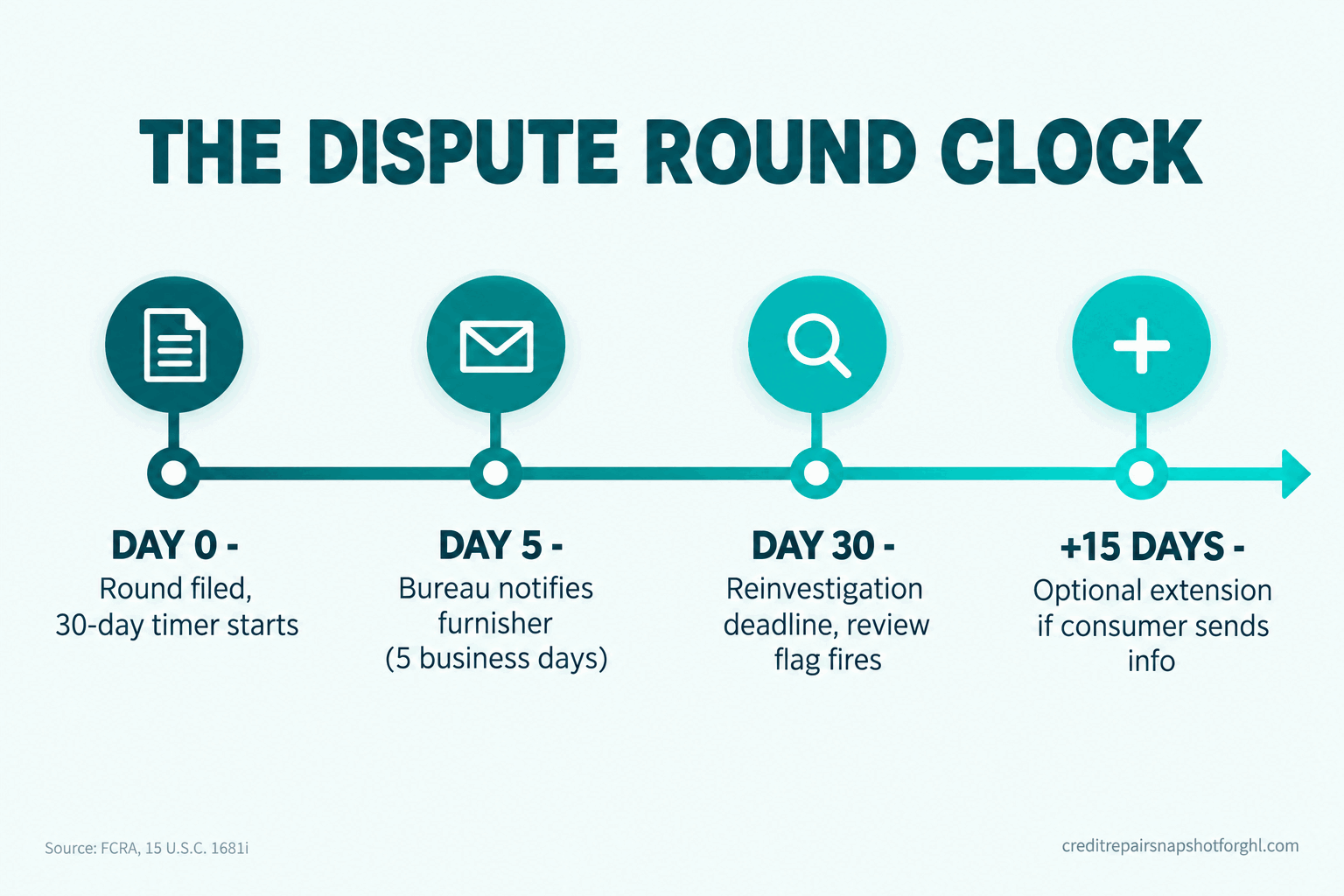
The trigger that moves it. Round filed starts a 30-day timer on the client’s record. When the window is up, the system surfaces the client for review and moves them toward Stage 5. The system tracks the workflow and the dates; you and the firm decide what to dispute and how. Keep that line clean, as covered in automating the Metro 2 workflow, not the letters.
The deadline it carries. The 30-day reinvestigation window (15 U.S.C. §1681i), plus the bureau’s own five-business-day step to notify the furnisher. You do not enforce the bureau’s clock, but you absolutely need to know when it runs out so you can act on results the day they are due.
How it breaks on a spreadsheet. The filing date goes in a cell, and the review date lives in your head or a calendar you stop checking. Thirty days later nothing reminds you, so results come back and sit for a week or two before anyone looks. Multiply that slippage across a full caseload and every client’s timeline stretches. A timer attached to the stage removes the guesswork entirely.
Stage 5: Results in, next move decided
What it is. The window closes, results arrive, and you decide the next move: another round, a different approach, or escalation. This is a decision stage, so the system’s only job is to make sure the decision gets made on time, by a person.
The trigger that moves it. When the 30-day timer expires, the client drops into a “needs action” view that you actually look at. Once you record the next move, the client either loops back to a new round or advances. Nothing leaves this stage on autopilot, because the decision is judgment, and judgment is yours.
The deadline it carries. Act within a few days of results landing. The whole point of tracking the clock in Stage 4 is to make this stage happen on time instead of two weeks late.
How it breaks on a spreadsheet. There is no “needs action” view in a grid. Results come back, the client is still sitting in the same row they have been in for a month, and nothing pulls them to your attention. So the fast movers get worked and the quiet ones get forgotten, which is the opposite of how a fair caseload should run.
Stage 6: Keep the client informed
What it is. The ongoing-communication layer that runs across the whole case, so an enrolled client always knows something is happening without you drafting a one-off message every time.
The trigger that moves it. Status changes fire the updates. When a round is filed, when a window closes, when you move to the next step, the stage change itself sends a short, honest progress note. You are not promising a result; you are reporting an action, which is both good service and good compliance.
Steal this (status-change progress texts).
Round filed: Hi {{first_name}}, quick update: we filed your next round today. The bureaus have up to 30 days to respond, so the next few weeks are mostly waiting. I’ll message you the moment results are in. Reply STOP to opt out.
Window closed, reviewing: {{first_name}}, the response window on your last round just closed and your file is now in review. I’ll have your next step mapped out shortly and will be in touch with what’s happening and what comes next.
How it breaks on a spreadsheet. Updates are a manual task with no trigger, so the moment you get busy they stop. The client hears nothing, assumes nothing is happening, and either starts calling (eating your week) or quietly drifts toward cancelling. Our client progress-update system exists for exactly this gap.
Stage 7: Graduate the client cleanly
What it is. The client’s engagement wraps up, and you close it out on purpose instead of letting it fade. A finished client is your warmest source of reviews and referrals, and the only time to ask is while the experience is fresh.
The trigger that moves it. Moving a client to “graduated” fires the review request and, a little later, the referral invite, then shifts them into a light long-term nurture so you stay in their contacts without manual effort.
The deadline it carries. Timing. Ask for the review within days of the finish line, not weeks, while the client still remembers how the process felt.
How it breaks on a spreadsheet. Finished clients just disappear off the bottom of the list. No review gets asked for, no referral gets invited, and the cheapest growth channel you have evaporates every single month. A stage that triggers the ask turns every clean finish into a potential two new clients.
Solo vs small team vs bigger shop
The pipeline is the same shape at every size. What changes is who touches which stage and how much you can hand off.
Solo operator (up to about 30 clients). You are every stage, so the system’s job is to be your memory. Automate the Stage 1 nurture, the Stage 2 compliance capture, the Stage 4 timers, and every Stage 6 update, and keep only the Stage 5 decision and the real conversations for yourself. Done right, “checking on the caseload” becomes glancing at one board for two minutes instead of a morning of tab-hunting.
Small team (roughly 30 to 100 clients). Now the stages become handoffs between people. A trained GoHighLevel VA can own Stages 1 through 3 and the Stage 6 messaging, while you keep the Stage 5 dispute decisions. The pipeline is what makes delegation safe: a new hire can see exactly where every client stands and what is overdue, without you explaining each one.
Bigger shop (100+ clients). At this volume the board becomes a management tool. You watch stage-by-stage counts, spot the bottleneck (usually clients piling up in Stage 5 waiting on decisions), and staff against it. This is also where a spreadsheet stopped working two years and many lost clients ago, and where the bottlenecks that cap you around 50 clients get solved for good.
Keeping the tracking compliant
A good tracking system is not just convenient. It is most of your compliance posture, because compliance in credit repair is ultimately about being able to prove what you did and when.
The contract and disclosure. CROA requires a written, signed contract (15 U.S.C. §1679d) and the “Consumer Credit File Rights” disclosure delivered before any contract is signed (§1679c). A pipeline that will not advance a client out of Stage 2 until both are captured and dated makes the compliant path the only path.
The advance-fee rule. You cannot charge for a service before it is fully performed (§1679b). Tying the first charge to a stage change (work begun, window opened) rather than a calendar date keeps billing on the right side of that line automatically.
The audit trail. There is no “I think we sent that” in a regulator’s office. Every stage change, message, and document in the pipeline is timestamped, which means your defense builds itself as you work. That is the quiet reason a system beats a spreadsheet: the spreadsheet records what you remembered to type, while the pipeline records what actually happened.
Keep the division of labor clear throughout. The system tracks workflow, dates, and communication. It never decides what to dispute, never promises a deletion, and never implies it is the credit repair organization. That judgment and that responsibility stay with you.
Common objections
“I already use Credit Repair Cloud (or similar), isn’t that my pipeline?” Dispute software is great at the letters and the bureau side. Where most operators still leak is everything around the disputes: lead follow-up, the compliance capture at enrollment, the client-facing updates, the review-and-referral finish. A pipeline in your CRM wraps the whole client journey, and it sits alongside your dispute tool rather than replacing it. We weigh the build-it-yourself versus buy-it decision in detail.
“My spreadsheet is fine, I only have twenty clients.” Twenty is exactly when to switch, because it is still small enough to move painlessly and already big enough that you are losing track. Waiting until you have sixty means migrating sixty live cases under pressure, which is the worst possible time. The best moment to get out of the spreadsheet was last year. The second best is at twenty clients.
“Setting all this up sounds like a month I don’t have.” Building it from scratch is a real project. That is the entire reason a prebuilt snapshot exists: the stages, timers, compliance capture, and status-triggered messages come already wired for credit repair, so you adopt a working pipeline instead of designing one. You spend the time running clients, not configuring software.
“Won’t the automated updates feel impersonal?” They feel like attention, which is the opposite of what clients experience now, which is silence. A short, honest “we filed your round today” beats a heartfelt message that never gets sent because you were busy. The automation handles the reliable part so you can spend your real time on the conversations that need a human.
Tuesday afternoon, rebuilt
Go back to that text: “Any update on my file?” This time you open one board. The client is sitting in Stage 5, flagged in a “needs action” view because their 30-day window closed yesterday, with the filing date, the round number, and the last update all on the card. You reply in fifteen seconds with something true and specific, move them to their next round, and the system fires the progress text before you have put your phone down.
No tab hunt. No scrolling past forty rows. No wondering whether a deadline slipped. The track is not in your head anymore, so losing it is not something that can happen. That is the whole difference between remembering your caseload and running it, and it is the difference between a business that stalls at fifty clients and one that keeps its promises at two hundred.
Frequently asked questions
How do credit repair businesses keep track of all their clients?
The ones who scale cleanly use a CRM pipeline, where every client sits in exactly one named stage (new lead, enrolled, reports pulled, round filed, results review, and so on), and each stage carries its own deadline and automatic actions. That replaces the spreadsheet-plus-memory approach that breaks down past roughly 30 to 50 clients. The pipeline shows the whole caseload at a glance and flags anything overdue, so nothing depends on remembering.
Why is a spreadsheet a bad way to manage a credit repair caseload?
A spreadsheet is a static grid with no sense of time, while a credit repair caseload is full of running clocks: the 30-day reinvestigation window, the next round date, monthly billing, monitoring checks. The grid only shows what you remembered to type, and it typically goes wrong quietly. Field audits found errors in at least 86% of real-world spreadsheets, per Panko's research, and a deadline-driven caseload is harder to keep clean than the budgets those audits examined.
What stages should a credit repair client pipeline have?
A practical pipeline has seven: new lead to booked consult; enrollment with the signed contract, disclosure, and cancellation window logged; reports pulled and plan built; round one filed with a 30-day timer started; results reviewed and the next move decided; an ongoing 'keep the client informed' layer; and a clean graduation that triggers the review and referral asks. Each stage has one clear condition that moves the client forward.
How does client tracking help with CROA compliance?
CROA requires a written, signed contract and a delivered 'Consumer Credit File Rights' disclosure before the contract is signed, a three-business-day cancellation right, and no fees charged before the service is performed (15 U.S.C. §1679b and following). A pipeline that will not advance a client until those documents are captured and dated, and that timestamps every action, builds the audit trail you need to prove compliance if a client, bank, or regulator ever asks.
When should I move from a spreadsheet to a real CRM pipeline?
Sooner than feels necessary. Twenty active clients is usually the point where tracking starts slipping but migration is still quick and low-risk. Waiting until sixty or eighty clients means moving a large live caseload under deadline pressure, which is the hardest possible moment. If you are already losing track or re-checking the same client twice, you are past due.
Does a tracking pipeline replace my dispute software?
No, it sits alongside it. Dispute tools like Credit Repair Cloud handle the letters and the bureau workflow well. The pipeline handles everything around the disputes that still leaks: lead follow-up, compliant enrollment, client-facing progress updates, and the review-and-referral finish. Together they cover the full client journey, which neither does alone.