It is 8:15 on a Tuesday. You open your dispute software to send a second round for a client who signed six weeks ago, and you cannot remember whether round one came back yet. You dig through a folder, find a bureau letter dated eleven days ago that you never logged, and realize the client has been sitting in silence the whole time. Then the phone rings. It is her, asking if anything is happening.
That gap, between the letter going out and anyone knowing what came back, is where small credit-repair shops quietly lose clients. The letters are not the hard part. Your dispute software already writes them. The hard part is everything around the letter: the clock, the response, and the client who is waiting.
The answer up front: you do not automate the dispute letter itself, because a human has to decide the strategy and the law forbids charging before the work is done. You automate the workflow around it. You let software handle the Metro 2 report import, the FCRA 30-day timer, the response logging, and the client update, so a letter going out triggers a tracked sequence instead of a sticky note you lose.
One line before anything else: this post is about operations and data plumbing. Nothing here disputes an item, decides what to challenge, or promises a score change. That stays with you, the firm.
Table of contents
- What a Metro 2 dispute letter actually is
- What the manual dispute workflow is costing you
- The line you cannot automate
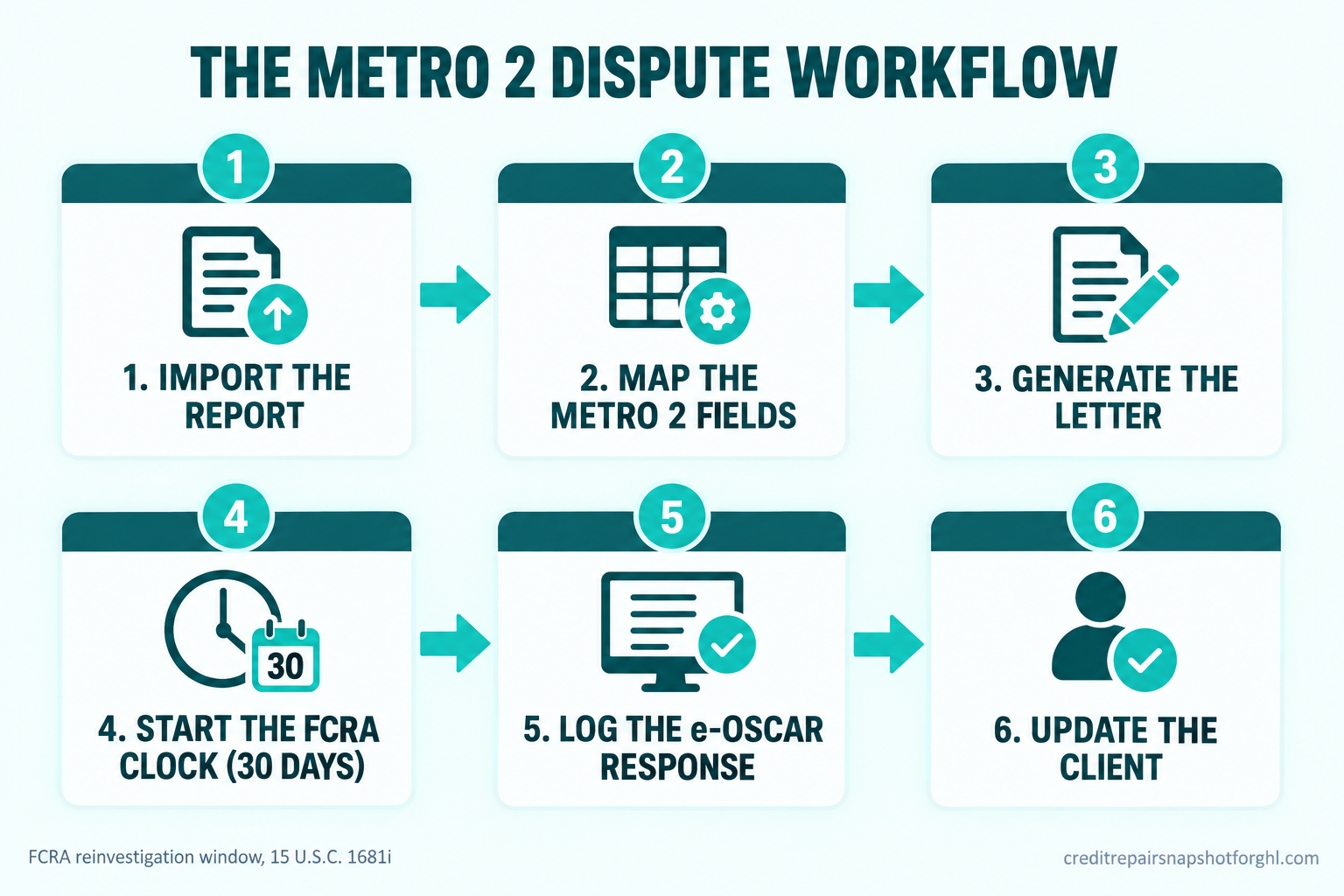
- The six-stage Metro 2 dispute workflow
- Stage 1: Import the report into Metro 2-aware software
- Stage 2: Map the dispute to the Metro 2 fields
- Stage 3: Generate the letter in your dispute software
- Stage 4: Start the FCRA clock the moment it mails
- Stage 5: Log the e-OSCAR response and decide the next round
- Stage 6: Keep the client updated automatically
- Steal this: the client update messages
- The same workflow at three sizes
- The compliance layer you cannot skip
- Objections
- FAQ
What a Metro 2 dispute letter actually is
Most operators say “Metro 2 dispute letter” and mean a letter that references the data fields a furnisher uses to report an account. That is close, but it helps to be exact, because the exactness is the whole point.
Metro 2 is a standardized electronic data format created and maintained by the Consumer Data Industry Association, the trade group for the credit bureaus. Banks, card issuers, collectors, and auto lenders all report your client’s accounts to Equifax, Experian, Innovis, and TransUnion in this one format. The required fields, account status codes, dates, balances, and special comment codes, are defined in the Credit Reporting Resource Guide, which the CDIA updates every year. A furnisher that reports data has to make it complete, accurate, and consistent with the format.
So a “Metro 2 dispute letter” is not a magic template. It is a dispute that targets the specific Metro 2 fields that are wrong or unverifiable on a tradeline: a date of first delinquency that does not line up, a balance that contradicts the status, an account that two bureaus report differently. When your dispute names the field, the bureau’s reinvestigation has something concrete to check against the furnisher’s record. When it is vague, you get the “verified as reported” bounce. If you have lived that bounce, the mechanics are in our breakdown of why bureaus reject or stall dispute letters.
The important takeaway for automation: the format is fixed and public, so the data your letter needs is structured. Structured data is exactly what software is good at importing, mapping, and tracking. The judgment about which field to challenge and why is what stays with you.
What the manual dispute workflow is costing you
Run the math on a single client. One round is a report pull, a review, a letter, a mailing, a 30-day wait, a response to read, and at least two client updates so they do not panic. Call it eight discrete steps. A client typically runs three to six rounds. That is 24 to 48 tracked steps per client, each with a date attached, and the dates do not line up across clients because everyone signed on a different day.
Do that by memory and folders and you drop steps. The dropped step is almost never the letter. It is the response you forgot to log, or the day-15 check-in you meant to send, or the next round you did not start because you did not know round one was back. Every dropped step either stalls a client’s progress or sends them to voicemail wondering if you are still working their file.
The demand is not the problem. Credit reporting is the largest single source of consumer complaints in the country, which tells you how many people have something on a report they want looked at.
Most of those 2024 complaints, about 2.5 million of the 2.7 million, were filed against the three nationwide bureaus, and the single most common issue was incorrect information on a report (CFPB Consumer Response Annual Report). That is your client base, and they arrive already frustrated with the system. A workflow that goes quiet confirms their worst assumption. The fix is not working faster by hand. It is making the workflow run itself between the human decisions.
2024 CFPB complaints about credit or consumer reporting, in millions. Of 2.7M total, roughly 2.5M named Equifax, Experian, or TransUnion. Source: CFPB Consumer Response Annual Report, 2025.
The line you cannot automate
Before the stages, the boundary, because getting this wrong is how good operators get into trouble.
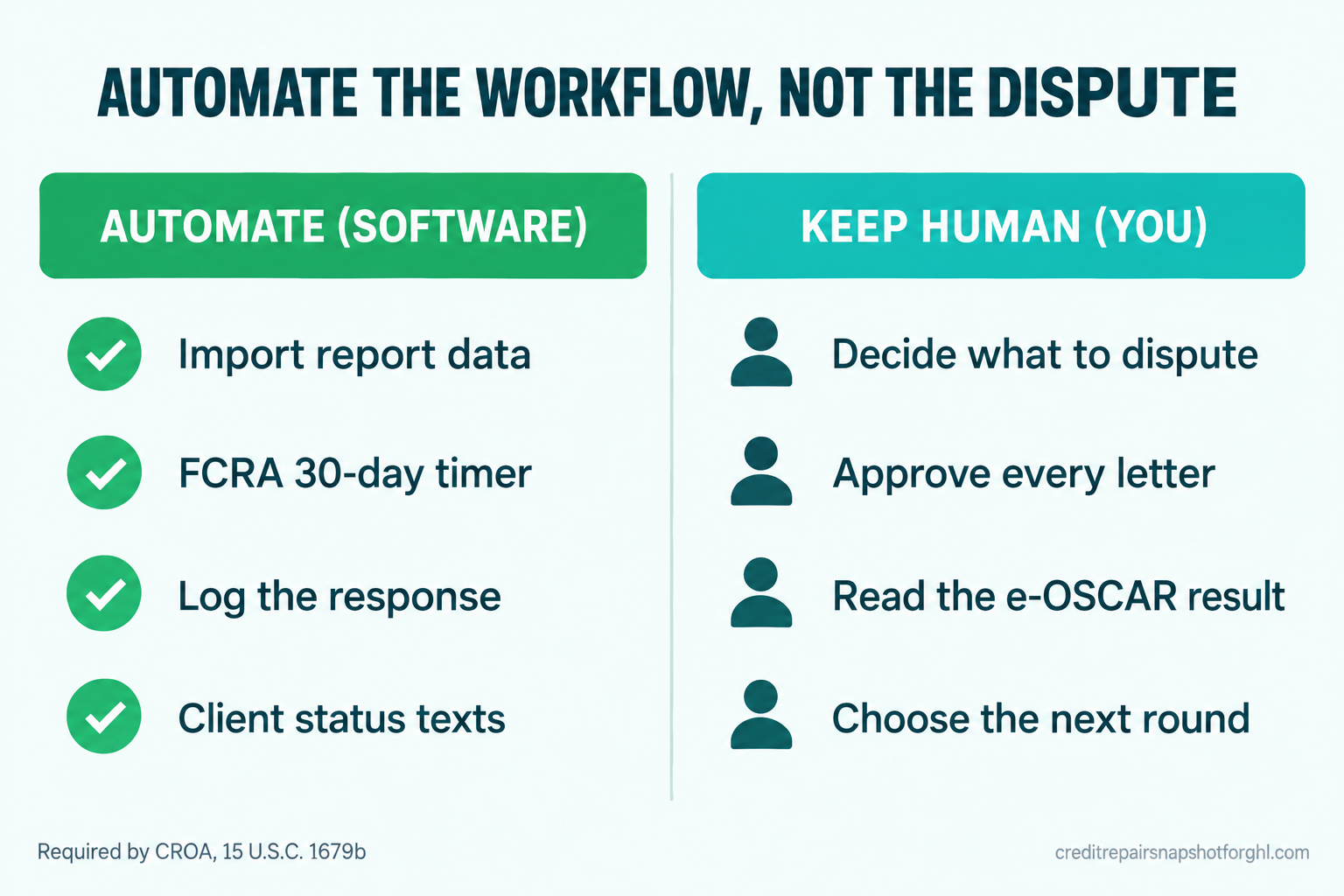
You can automate the data and the clock. You cannot automate the dispute decision, and you cannot charge for work before it is done. The Credit Repair Organizations Act bans collecting any fee before the service is fully performed, no matter what you call it, and it bans telling a client you can remove accurate information or promising a specific result. A piece of software that auto-generates and auto-sends disputes with no human reviewing strategy is not a time-saver, it is a liability, because it can fire off claims the client cannot stand behind.
So the rule for everything below is simple. Software prepares, times, logs, and informs. A human reads the report, decides what is genuinely inaccurate or unverifiable, approves the letter, and reads the response. That division keeps you inside CROA and still removes the manual drudgery that caps your client count. We go deeper on pacing rounds safely in how to automate dispute rounds without losing compliance.
The six-stage Metro 2 dispute workflow
Here is the whole path from a signed client to a tracked round, broken into six stages. Each one has a setup, the real copy or trigger where it matters, and the way it breaks when you skip it.
| Stage | By hand it breaks when | Automated, it |
|---|---|---|
| 1. Import the report | you re-key fields and fat-finger a date | pulls structured Metro 2 data into one record |
| 2. Map the dispute | you challenge vaguely and get auto-verified | flags the exact fields you choose to dispute |
| 3. Generate the letter | a template goes out unreviewed | drafts it for a human to approve and send |
| 4. Start the clock | you forget the 30-day deadline | sets the FCRA timer and reminders on mail date |
| 5. Log the response | the bureau reply sits unread for days | captures the result and routes the next action |
| 6. Update the client | they call you because it went silent | sends the status update they opted in to |
The Metro 2 dispute workflow: what the manual version drops, and what an automated workflow holds for you at every stage.
Stage 1: Import the report into Metro 2-aware software
The setup. The client enrolls in a monitoring service in their own name and shares access, then you import the three-bureau report into your dispute software. You never order the report for them. Having the client enroll keeps you clean on permissible purpose and funds your runway, since you cannot charge in advance. The full plumbing is in how to connect credit monitoring to your CRM.
Why it matters for Metro 2. A proper import lands the structured tradeline data, account numbers, statuses, dates, and balances, as fields you can act on, not a flat PDF you squint at. That structure is what makes stages two through five automatable.
How it breaks. The classic failure is skipping the import and re-keying a report by hand into your CRM at 9pm. One transposed date of first delinquency and your dispute argues the wrong thing, or worse, asserts something the client’s record does not support. Import the data, do not retype it.
Stage 2: Map the dispute to the Metro 2 fields
The setup. With the report imported, you, the human, review each negative item and decide which are genuinely inaccurate, incomplete, or unverifiable. For each one you choose, you flag the specific Metro 2 field in question: the status code, the date, the balance, the account designator. Your software tags those fields to the item.
The copy that matters here is internal. Keep a short, honest reason note on every disputed field, for example: Item 3, Collection, DOFD reported 03/2021 on Experian, 08/2021 on TransUnion, dates inconsistent across bureaus. That note is your evidence trail and your defense that a person made a reasoned decision.
How it breaks. Disputing the whole account as “not mine” when the real issue is one wrong field invites a frivolous determination, and the bureau can brush off a reinvestigation it reasonably believes is frivolous. Precise, field-level disputes are harder to wave away. Again, the deeper mechanics are in our bureau rejection breakdown.
Stage 3: Generate the letter in your dispute software
The setup. Your dispute software, Credit Repair Cloud, DisputeFox, ScoreCEO, Client Dispute Manager, or DisputeBee, generates the letter from the fields you flagged. This is the one step that absolutely lives in your dispute tool, not your CRM, because the letter library and bureau formatting are its job. If you are still choosing a tool, we compared them on real total cost in the best credit repair software for a solo operator.
The boundary. The software drafts. You read it before it leaves. A thirty-second review catches the letter that names the wrong bureau or recycles a reason that does not fit this client. Approve, then mail.
How it breaks. Full auto-send is the trap. A tool that mails unreviewed disputes in bulk eventually sends something sloppy to a furnisher, and sloppy at scale is how firms end up in a regulator’s file. Keep the human approval. It costs seconds and it is the difference between a workflow and a risk.
Stage 4: Start the FCRA clock the moment it mails
The setup. This is the single most valuable automation in the whole workflow. The day a round mails, you log the mail date, and that date starts a timer. Under 15 U.S.C. §1681i, the bureau must complete its reinvestigation within 30 days of receiving the dispute, extendable to 45 days if the client provides additional relevant information during the window. Your workflow sets the deadline, a mid-window checkpoint, and a “response due” alert, automatically, for every client, without you tracking a single calendar.
The trigger. Mail date logged fires three things: a day-15 soft check-in to the client, a day-30 internal task to confirm a response arrived, and a day-35 escalation task if nothing came back so you can follow up with the bureau.
How it breaks. By hand, every client’s clock runs on a different day and you cannot hold 30 of them in your head. Rounds silently expire, clients stall, and you only notice when someone calls. The timer removes the thing humans are worst at, remembering dates across dozens of files.
The FCRA dispute clock, in days. The 30 and 45-day figures are the statutory reinvestigation window under 15 U.S.C. §1681i; the round-to-round figure is a common operational cadence, not a legal requirement, and varies by firm.
Stage 5: Log the e-OSCAR response and decide the next round
The setup. When a client disputes, the bureau creates an electronic form called an ACDV, Automated Consumer Dispute Verification, and routes it through e-OSCAR, the web-based system the bureaus built in 1993 and jointly operate, to the furnisher for verification. The result comes back as a report change or a “verified.” You log that outcome against the round. Your software can capture the status, but a human reads what actually happened.
The decision that stays human. A “verified as reported” is not a dead end, it is information. Maybe the furnisher’s record genuinely matches, maybe you need a different field or a method-of-verification request next round. You decide. The software then teees up the next round’s tasks and restarts the clock from stage four.
How it breaks. The response sits unread for a week because nothing told you it arrived, and the client’s momentum dies in that week. Logging the response the day it lands, and routing the next action automatically, is what keeps a case moving at the pace the client is paying for.
Stage 6: Keep the client updated automatically
The setup. Every status change in stages four and five fires a client update: round mailed, still in the window, response in, next round going out. These are the messages that decide whether a client stays enrolled, because most cancellations are not about results, they are about feeling forgotten. Texting clients means you must be registered for A2P 10DLC first, which credit repair routinely gets rejected for on the first try, so read why credit repair texts get rejected at A2P 10DLC before you send a single automated message.
The boundary. Every message describes process, never a promised outcome. “We mailed round one” is fine. “Your score will jump” is not, and it violates CROA. Keep the language to what you did and what happens next.
How it breaks. Over-texting annoys, under-texting loses. The sweet spot is an update on real events only, mail date, window status, response, next round, with a clear opt-out on every message. The verbatim copy is in the next section.
Steal this: the client update messages
Here are the five messages that carry the whole client relationship through a round. Swap the bracketed fields for your merge tags. Every one describes process only, and every one assumes the client opted in to texts at onboarding. Keep a Reply STOP to opt out line on SMS.
1. Round mailed (day 0).
Hi [first name], [firm] here. We prepared and mailed your first round of
dispute correspondence to the bureaus today. By law they have 30 days to
investigate. Nothing you need to do right now, and we'll text you the moment
anything changes. Reply STOP to opt out.
2. Mid-window check-in (day 15).
Hi [first name], quick status from [firm]. Round one is still inside the
bureaus' 30-day review window, so no news this early is completely normal.
We're watching your file. Questions anytime, just reply here.
3. Response in, report changed.
Hi [first name], update on your file: the bureaus returned results on round
one and your report changed. We're reviewing exactly what moved and what still
needs work, and we'll have your next step ready within 2 business days.
4. Response in, items verified.
Hi [first name], the bureaus finished round one and verified some items as
reported. That's common on a first pass, and it's the reason we work in rounds.
We're preparing round two now with a different approach. You're fully enrolled
and nothing changes on your end.
5. Next round out.
Hi [first name], round two is going out today. Same careful process, fresh
documentation. The 30-day clock restarts from today's mail date, and we'll keep
you posted at each step.
Notice what is missing: no score promises, no “guaranteed,” no timeline you cannot control. That is deliberate. These messages do one job, they prove you are working the file, which is the actual reason clients keep paying. Pair them with a self-serve view and you field even fewer calls, which is the case for a credit repair client portal.
The same workflow at three sizes
The six stages do not change. What changes is how you staff and enforce them.
Solo operator, under 50 clients. You are the human in every stage, so the automation you cannot skip is stage four, the clock. One missed deadline is a bigger share of your book when the book is small. Set the timer, trust the day-30 task, and let the update messages run so you are not texting by hand at night. This is usually the single change that lets a solo shop stop feeling underwater, and it is the same ceiling we unpack in why you can’t scale past 50 clients.
Small team, 50 to 200 clients. Now stages two and five need ownership, because a shared inbox means responses fall between people. Put every round in one pipeline with a stage per step, assign each client an owner, and set a service standard: responses logged within 24 hours of arrival. The clock automation becomes a team dashboard, not a personal memory.
Larger firm, 200-plus. Volume means e-OSCAR responses come in batches and a single reader cannot keep up, so you separate roles, an import-and-map role, a letter-approval role, a response-logging role, with a QA sample pulled weekly to confirm disputes stay precise and reasoned. The audit trail from stage two, the reason note on every field, is what protects the firm at this size. The automation carries the dates and the client comms so the humans spend their hours on judgment, not logistics.
The compliance layer you cannot skip
Four rules sit under this entire workflow. None is optional.
No advance fees. You cannot collect for a round before it is fully performed, whatever you label the charge (15 U.S.C. §1679b). Build your billing to charge after work, and plan for roughly three months of runway while recurring revenue catches up.
The written contract and three-day right to cancel. CROA requires a written contract and a three-business-day cancellation right with a separate notice (FTC guidance). Your onboarding has to capture both before any work starts. The step-by-step is in our CROA-compliant onboarding checklist.
No outcome claims, anywhere. Not in your letters, not in your texts, not on your site. Describe process and effort, never a promised deletion or score change. The update messages above are written this way on purpose.
A2P 10DLC before you text. Automated client updates are the heart of stage six, and you cannot send them until your messaging campaign is registered and approved, which credit repair frequently fails on the first attempt. Handle that first, or your best automation never delivers.
Objections
“Isn’t automating dispute letters against CROA?” No, and this is the most common misread. CROA bans advance fees and false promises, not software. Generating a letter from fields you chose, timing the FCRA window, and texting a status update are all legal. What would cross the line is charging before the work is done, promising a result, or letting software send disputes with no human deciding strategy. Keep the human in stages two, three, and five and you are fine.
“My dispute software already makes the letters, so why do I need anything else?” Because letter generation is one of six stages. Your dispute tool is excellent at drafting and at the bureau formatting. It is usually weak at the clock across dozens of clients, at nudging you when a response lands, and at the client-facing updates that prevent cancellations. That operational layer is the gap, and it is where your time actually goes.
“Won’t clients find automated texts annoying?” Only if you over-send or make it salesy. The messages above fire on real events a client cares about, four or five times per round, with an opt-out. Clients do not cancel because you updated them. They cancel because you went quiet and they assumed nothing was happening. Status updates are the cheapest retention you can run.
“Can software just read the e-OSCAR response and start the next round for me?” Partly, and this is the line to hold. Your tools can capture whether an item changed or was verified and can queue the next round’s tasks. They should not decide the next round on their own. A “verified” needs a human to judge whether the record is genuinely accurate or whether a different field or a method-of-verification request is the right next move. Automate the capture, keep the decision.
Finishing the Tuesday
Back to that 8:15 Tuesday. In a workflow that runs itself between decisions, that round one response does not sit in a folder for eleven days. The day it posts, the result is logged, the next-step task is on your list, and the client already got the text that says the bureaus responded and you are reviewing. She does not call, because she is not wondering. You open your software, see exactly where every client stands, and spend the morning on the one thing software cannot do: deciding what to challenge next.
That is the whole promise of automating around Metro 2 dispute letters. You keep the judgment. You hand off the dates, the logging, and the updates. And the clients stop ghosting, because the system never goes silent.
Metro 2 dispute letters and workflow automation: FAQ
What is a Metro 2 dispute letter?
It is a dispute that targets the specific data fields a furnisher uses to report an account in the Metro 2 format, the standardized electronic format maintained by the Consumer Data Industry Association and defined in the annually updated Credit Reporting Resource Guide. Instead of vaguely challenging an account, a Metro 2-aware dispute names the exact field that is wrong or unverifiable, such as a date of first delinquency, a balance, or a status code, which gives the bureau's reinvestigation something concrete to check.
Can you legally automate Metro 2 dispute letters?
You can automate the workflow around them, not the dispute decision. CROA bans charging any fee before a service is fully performed and bans promising specific results, but it does not ban software. Generating a letter from fields a human selected, timing the FCRA window, logging the response, and sending process-only status updates are all legal. Letting software decide what to dispute and auto-send it with no human review is the part to avoid.
How long do the credit bureaus have to respond to a dispute?
Under 15 U.S.C. §1681i, a consumer reporting agency generally has 30 days from receiving the dispute to complete a reasonable reinvestigation, recording the current status of the item or deleting it. That window can extend to a maximum of 45 days if the consumer provides additional relevant information during the initial 30-day period. Automating that clock for every client is the most valuable step in the whole workflow.
What is e-OSCAR and ACDV?
e-OSCAR is the web-based system the nationwide bureaus built in 1993 and jointly operate to process disputes with data furnishers. When a consumer disputes an item, the bureau creates an electronic form called an ACDV, Automated Consumer Dispute Verification, and routes it through e-OSCAR to the furnisher to verify the data. The furnisher's response comes back the same way, and that result is what you log in stage five before deciding your next round.
Does your system write the dispute letters?
No. The letters stay in your dispute software, which is built for that job. The operational system handles everything around the letter: importing the report data, timing the FCRA clock, logging responses, and sending the client updates. That division keeps a human in charge of dispute strategy, which is what CROA requires, while removing the manual tracking that caps how many clients a small firm can carry.
Which software generates Metro 2-compliant dispute letters?
The common dispute tools solo and small operators use are Credit Repair Cloud, DisputeFox, ScoreCEO, Client Dispute Manager, and DisputeBee. They differ on price, client capacity, and features, and we compared them on real total cost in our solo-operator software guide. Any of them can generate the letters; the gap each one leaves is the operational workflow, the clock and client communication, which is what you build on top in your CRM. Remember CROA still bars charging for any round before it is fully performed, so plan for about three months of runway.