

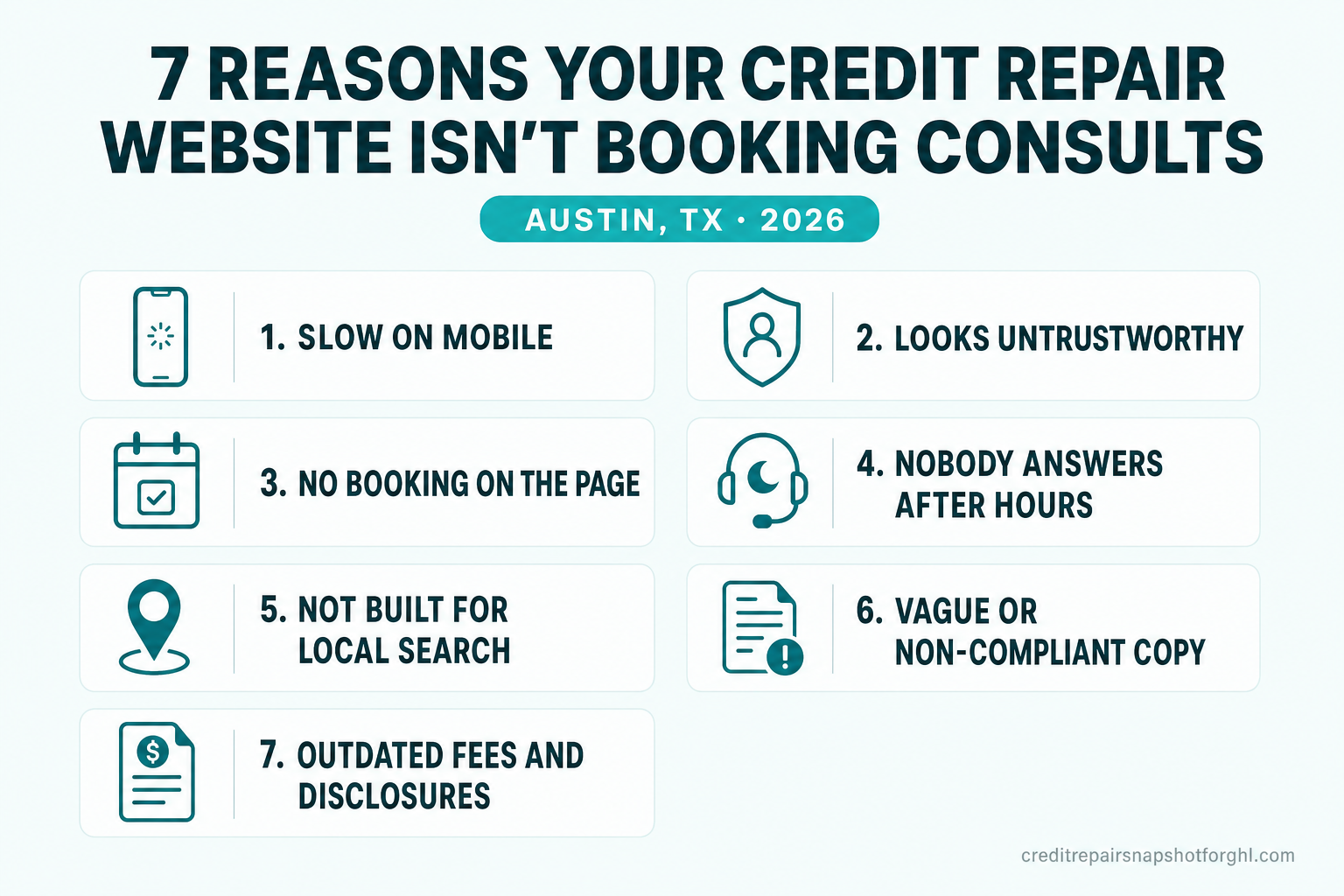
If your Austin credit repair website gets visits but almost no booked consults, the problem is rarely traffic — it’s conversion leaks: a page that loads too slowly on a phone, looks untrustworthy, gives no way to book on the page, goes silent after hours, is invisible for “credit repair near me,” and carries vague or drifted copy. Fix those seven leaks and the same traffic starts producing consultations. This is a practical, numbers-first walkthrough for owners and the GoHighLevel agencies that serve them.
One thing up front, because it shapes everything a credit-repair site must do: you can’t buy your way around a weak website with ads. Google Ads prohibits credit-repair advertising outright (Google Ads policy). That means every visitor you get is hard-won through SEO, referrals, and social — and losing one to a conversion leak is pure waste. We sell the operating system, never the outcome: nothing here promises a score change or a deletion, and neither should your website.
Table of contents
- Why your website is the whole funnel in Austin
- Leak 1: It’s too slow on mobile
- Leak 2: It looks untrustworthy
- Leak 3: There’s no way to book on the page
- Leak 4: Nobody answers after hours
- Leak 5: It’s invisible for “credit repair near me”
- Leak 6: The copy is vague — or non-compliant
- Leak 7: Your fees and disclosures have drifted
- What a converting credit-repair website looks like
- Fix or rebuild? An honest test
- Frequently asked questions
- About the author
- Sources
Why your website is the whole funnel in Austin
Austin is one of the fastest-growing major metros in the country — the Austin–Round Rock–San Marcos area passed 2.6 million residents and grew ~2.1% in a single year, the fastest rate among Texas’s big metros (U.S. Census Bureau; Community Impact, 2025). That’s a lot of newcomers opening credit lines, financing homes and cars, and — inevitably — some getting denied. Demand is real. The question is whether your website converts it or leaks it to a competitor.
For most local businesses, the website is one channel among many. For a credit-repair firm it’s closer to the entire funnel, for one structural reason already noted: Google prohibits credit-repair ads (Google Ads policy), and Meta places the category under restricted financial rules. You can’t spend your way to the top of the results. So the visitors who do find you — through organic search, a referral partner, or social — have to convert on the page itself, because there’s no cheap paid retargeting to catch the ones who bounce.
That raises the stakes on every conversion leak below. A leaky site in a niche that can run ads is an inefficiency. A leaky site in credit repair is a hole in the only bucket you have.
Leak 1: It’s too slow on mobile
Nearly 60% of web traffic is now mobile (StatCounter), and credit-repair traffic skews even more toward phones — people check their credit situation on the couch, not at a desk. Mobile visitors are also the least patient audience on the internet: 53% of mobile visits are abandoned when a page takes longer than 3 seconds to load (Think with Google).
It gets worse the slower you are. Google’s benchmark study found that as mobile load time climbs from 1 second to 5 seconds, the probability of a bounce rises by 90% (Think with Google, 2017).
How to fix it. Measure first: run your homepage and a service page through Google’s PageSpeed Insights and note the mobile score. If you’re under ~50, the platform is usually the bottleneck — plugin-heavy WordPress, Wix, or page-builder sites carry weight a credit-repair brochure site doesn’t need. A static-first build served from a CDN is the durable fix; we walk through the mechanics in our Core Web Vitals playbook and the Astro vs GoHighLevel speed comparison.
Leak 2: It looks untrustworthy
A visitor decides whether your site feels safe almost instantly — users form a first impression in roughly 50 milliseconds, and that judgment predicts how they rate the site even after longer exposure (Lindgaard et al., 2006). And that first impression is overwhelmingly visual: about 75% of users say they judge a company’s credibility based on its website design (Stanford Web Credibility Project).
For credit repair, trust isn’t a nice-to-have — it’s the whole sale. The niche is shadowed by scam operators, and your prospect just got denied on something that matters. A dated template, stock photos of handshakes, no real team, and no visible reviews reads as risky. That matters because 71% of consumers regularly read reviews before choosing a local business (BrightLocal, 2025) — though notably, only 42% now trust reviews as much as a personal recommendation, down from 79% in 2020, so reviews help but no longer carry the sale alone.
Owners obsess over their copy and forget the page has already spoken before anyone reads it. A clean, current design with your real team, your written process, and honest reviews on it is the cheapest trust you’ll ever buy — and the fastest to lose with a template that looks like 2014.
How to fix it. Show the humans (a real team page), show the process (what actually happens after they book, in plain, compliant language), and show the proof (a live feed of honest Google reviews — earned, never incentivized). If reviews are thin, that’s its own project; start with our Google reviews playbook.
Leak 3: There’s no way to book on the page
Here’s the leak owners underestimate most. A prospect is convinced — and the only next step you offer is a phone number, or a contact form that lands in an inbox. 67% of consumers say they prefer to book online rather than call, email, or walk in (GetApp, 2024). If the path to a consult is “call us during business hours,” you’re asking your most motivated visitor to do the thing they least want to do.
Contact forms leak too, because friction kills them. The more fields and steps you add, the more people quit — Baymard Institute puts average online form/checkout abandonment at 70.19% across 49 studies, and finds that better checkout-and-form design alone can lift completion by ~35% (Baymard Institute). A ten-field “credit evaluation” form is a leak; a two-tap “pick a time” calendar is a booking.
How to fix it. Put a booking calendar directly on the page — hero, service pages, and a dedicated consultation page — so a decided visitor self-books in seconds. Keep the intake form to the minimum you truly need; collect the rest on the call. See how on-page booking changes the math in our consultation no-show and booking guide.
Leak 4: Nobody answers after hours
People don’t think about their credit file at 10 a.m. They think about it after a declined application, on a Sunday night. If your only response channel is a phone that rings out and a form checked “when someone gets to it,” the enquiry goes cold — and in this niche, cold is measured in minutes.
The data on speed-to-lead is stark. The classic Lead Response Management study found that contacting a web lead within 5 minutes makes it about 21× more likely to qualify than waiting 30 minutes, and the odds of even reaching the lead drop roughly 100× over that same window (via HBR, 2011). A two-day reply to a “how much?” DM isn’t a slow win — it’s a loss to whoever answered first.
How to fix it. Add an AI chat widget that qualifies and books 24/7, and an AI receptionist that answers the calls nobody’s free to take — both drafted to stay inside CROA guardrails and hand off to a human when needed. We cover the widget in our after-hours chat breakdown and the phone side in why firms add an AI receptionist.
Leak 5: It’s invisible for “credit repair near me”
You can have a fast, beautiful, bookable site and still get no traffic to leak, because it never shows up when an Austin consumer searches. Local search rewards sites with real local relevance: dedicated city pages, dedicated service pages, correct schema, and a clean sitemap. A single “Services” page trying to rank for every service in every neighborhood ranks for none.
This is where credit repair’s ad ban bites again — organic local search is one of your only two front doors (the other is social). If your site is a three-page brochure with no city or service depth, you’re invisible for exactly the high-intent searches (“credit repair Austin,” “fix credit before mortgage Round Rock”) that would have converted.
How to fix it. Build a page per service (consumer disputes, business credit, debt validation, coaching, post-bankruptcy rebuild) and a page per city you serve, each with genuinely local, useful content and proper structured data. Our local SEO playbook and organic growth guide lay out the architecture.
Leak 6: The copy is vague — or non-compliant
Two opposite copy problems leak consults. The first is vagueness: a homepage of “we help you achieve your financial dreams” tells a skeptical, denied buyer nothing about what actually happens, what it costs, or why you’re safe. The second is far more dangerous: overpromising. Any language that implies a guaranteed score jump, a promised deletion, or a specific outcome isn’t just a conversion problem — it’s a CROA and state-law problem that can attract exactly the wrong attention.
How to fix it. Rewrite each page to answer the three questions a denied buyer actually has — What is your process? What does it cost? Why are you safe to trust? — in plain, specific, outcome-free language. Specific-and-compliant beats vague-or-hyped every time.
Leak 7: Your fees and disclosures have drifted
The quietest leak of all: a prospect reads a price on your site, books, and then hears a different number on the call. Or your disclosures reference terms you changed a year ago. That gap reads as either bait-and-switch or carelessness — and for a buyer already primed to distrust the niche, either one ends the relationship before it starts.
Drift happens because editing most websites is a chore — an email to a developer, a quote, and a wait — so owners simply stop. Fees go stale, an old promo lingers, a consultant who left is still on the team page. Every one of those is a small credibility leak, and they compound.
How to fix it. Treat the site as a living document: whatever you actually charge and actually promise today should be what’s on the page today. That’s far easier when an edit is a request, not a project — which is the difference a fully managed build makes.
What a converting credit-repair website looks like
Put the leaky site next to the one that books and the pattern is obvious.
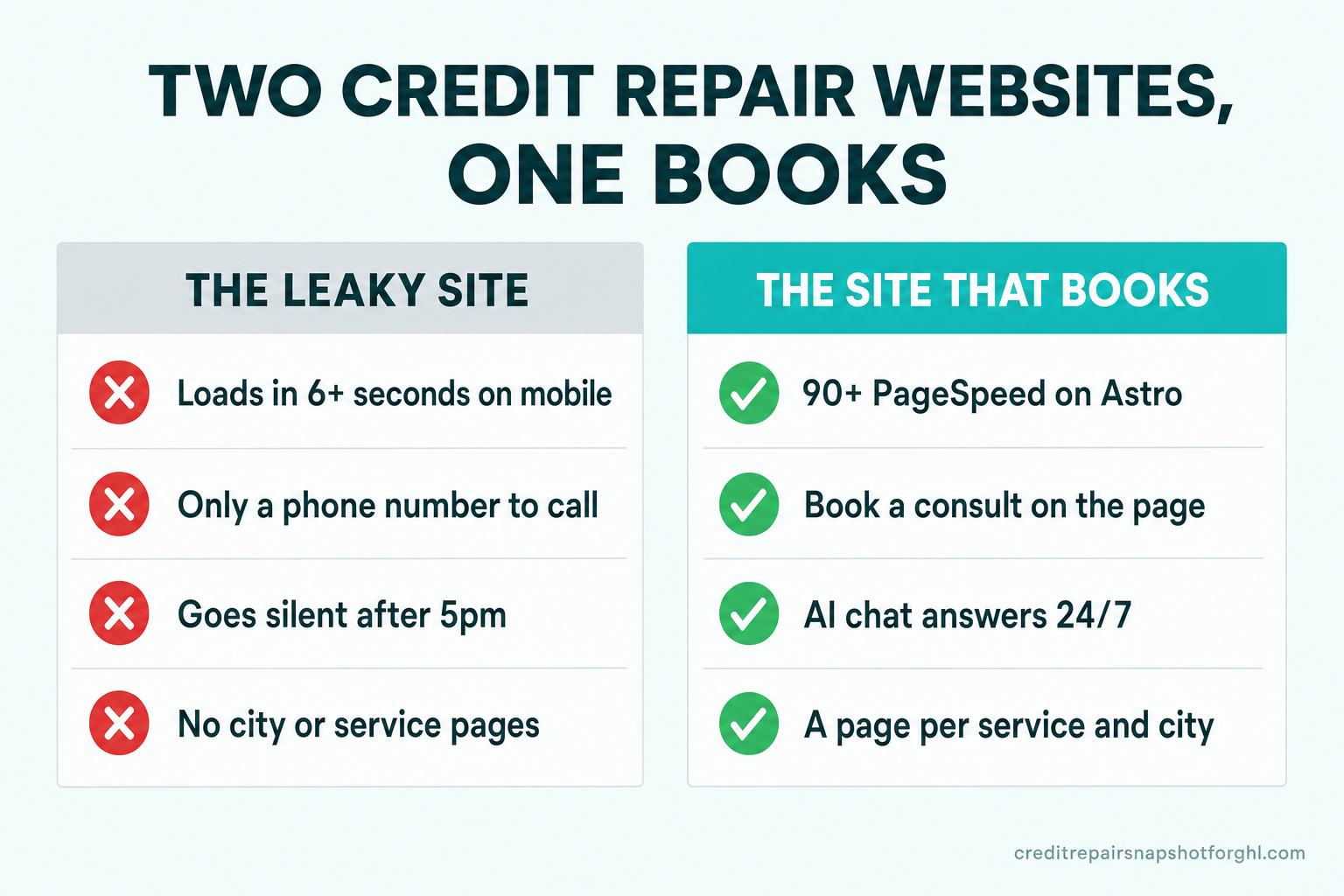
Here’s the same contrast as a scorecard for a typical Austin owner-operated firm.
| Factor | The leaky site | The site that books |
|---|---|---|
| Mobile speed | 5–8s load, high bounce | 90+ PageSpeed, loads instantly |
| First impression | Dated template, no real team | Clean, current, real people and process |
| Booking | Phone number or long form | Consultation calendar on the page |
| After hours | Voicemail and unread DMs | AI chat + receptionist reply 24/7 |
| Local search | One “Services” page | A page per service and per city |
| Copy | Vague or outcome-promising | Specific, process-based, CROA-safe |
| Fees & disclosures | Drifted, hard to edit | Current — edits are a request, not a project |
None of that promises a result — no website can, and any firm claiming one isn’t being honest. What the right column buys is a page that turns hard-won traffic into booked consults instead of leaking it back to Google.
That’s exactly what our credit-repair website build is designed to do: it ships on the Astro framework with a 90+ Google PageSpeed guarantee on mobile and desktop, a page for every service you run and every city you take clients from, consultation booking on the page, local SEO with schema, and managed hosting — so a Sunday-night visitor who was just declined reads a fast page, understands your process, and books themselves. Fees and disclosures stay current because an edit is a request we turn around in days, not a quote and a wait.
Fix or rebuild? An honest test
Not every leaky site needs a rebuild. Patch in place when the bones are sound — a decent, reasonably fast platform where you can add a booking calendar, refresh the design, tighten the copy, and stand up service and city pages without fighting the tool. If your only issues are Leak 3 (booking), Leak 6 (copy), and Leak 7 (drift), you can likely fix them where you are.
Rebuild when the platform is the leak. If the site is fundamentally slow because it’s plugin-bloated or page-builder-heavy (Leak 1), if editing is so painful that fees have drifted for a year (Leak 7), and if there’s no clean way to add real local pages (Leak 5), you’ll spend more patching than replacing — and still lose on speed. A static-first rebuild closes several leaks at once. For the platform-level trade-offs, our Astro vs GoHighLevel comparison is the deeper read, and if your bottleneck is broader than the website, a dedicated GHL VA or the full done-for-you social channel may pair with it.
Either way, the sequence is the same: measure the leaks, close the cheap ones first (booking, copy, fees), and rebuild only when the platform is the thing standing between your traffic and a booked consult. If you want a second set of eyes on which camp your site is in, tell us what’s happening or book a walkthrough.
Frequently asked questions
How do I know if my credit repair website has a conversion problem or a traffic problem?
Check two numbers. First, are people arriving at all? Look at your analytics for monthly visitors to key pages. If traffic is near zero, that's a traffic/SEO problem (Leak 5). If traffic exists but consults don't, that's a conversion problem — run through Leaks 1–4, 6, and 7. A fast, useful diagnostic: open your own site on your phone on cellular data, time how long it takes to load, and try to book a consultation. If either is painful, you've found a leak.
What's the single most important fix for an Austin credit repair site?
For most firms it's putting a booking calendar directly on the page (Leak 3), because 67% of consumers prefer to book online rather than call and it converts your most motivated visitors immediately. Close behind is mobile speed (Leak 1), since 53% of mobile visitors leave a page that takes over 3 seconds. Fix booking and speed first; they're the leaks that waste the most already-earned traffic.
Can't I just run ads to get more consults instead of fixing the website?
No — and this is specific to credit repair. Google Ads prohibits credit-repair advertising outright, and Meta restricts it heavily, so the paid shortcut most local businesses use isn't available to you. Your organic search, referrals, and social are the traffic you have, which makes every conversion leak on the website more expensive, not less. Fixing the site is the highest-leverage move you have.
Will putting an AI chat widget on my site create a CROA compliance risk?
Not if it's set up correctly. A credit-repair-specific chat agent is scripted to describe your process and book a consultation — never to promise a score change, a deletion, or any outcome, and never to give legal or financial advice. It qualifies the visitor and hands off to a human when a question needs one. You remain the regulated party and approve the scripts. Done right, it closes the after-hours leak without adding compliance exposure.
How fast can a rebuilt website actually load, and does it matter for ranking?
A static-first site built on Astro and served from a CDN can hit a 90+ Google PageSpeed score, often 100, on both mobile and desktop. It matters twice: fast pages convert more of your mobile traffic (bounce probability rises 90% as load time goes 1s to 5s), and Core Web Vitals are a Google ranking signal, so speed helps you get found and helps you convert once found.
How much does a credit repair website that's built to convert cost?
Our managed Astro build starts at $127/month plus a one-time $697 build fee for the fully managed website, with higher tiers that add an AI engine (receptionist, chat, and SMS agents) or a content engine. That includes managed hosting, the 90+ PageSpeed guarantee, a page per service and per city, on-page booking, and updates handled as requests rather than quotes. See the full breakdown on the pricing page.
About the author
Simone Braxton is a GHL automation strategist who spent eight years running back-office operations for credit-repair firms before moving full-time into GoHighLevel implementation. She specializes in turning client onboarding and follow-up — including the website-to-consult handoff — into repeatable, CROA-safe workflows, and writes about the operational details that decide whether a firm scales or stalls.
Editorial personas are original and fictional, created for editorial attribution and subject-matter framing. They are not real staff and do not provide legal or financial advice.
Related posts
- How to Fix a Slow Credit-Repair Website in Philadelphia (Core Web Vitals Playbook)
- Astro vs GoHighLevel Websites for Credit Repair Firms in Miami
- AI Chat Widget for Credit Repair Websites: Why Chicago Firms Lose After-Hours Leads
- Credit Repair Local SEO: The San Diego Playbook
- How Phoenix Credit Repair Firms Get More Google Reviews on Autopilot
Sources
- Lindgaard et al. — Attention web designers: You have 50 milliseconds (Behaviour & Information Technology, 2006): tandfonline.com
- Stanford Web Credibility Project — guidelines: credibility.stanford.edu
- Think with Google — mobile site load time statistics (53% abandon >3s): thinkwithgoogle.com
- Think with Google — mobile page speed industry benchmarks (+32% / +90% bounce probability, 2017): thinkwithgoogle.com
- StatCounter — desktop vs mobile platform market share: gs.statcounter.com
- BrightLocal — Local Consumer Review Survey (2025): brightlocal.com
- GetApp — online booking / appointment scheduling research (2024): getapp.com
- Baymard Institute — cart/form abandonment rate: baymard.com
- Harvard Business Review — The Short Life of Online Sales Leads (Lead Response Management study, 2011): hbr.org
- Google Ads — Credit repair services policy (advertising prohibited): support.google.com/adspolicy
- U.S. Census Bureau — QuickFacts, Austin city, Texas: census.gov
- Community Impact — Central Texas population growth, Census data (2025): communityimpact.com