

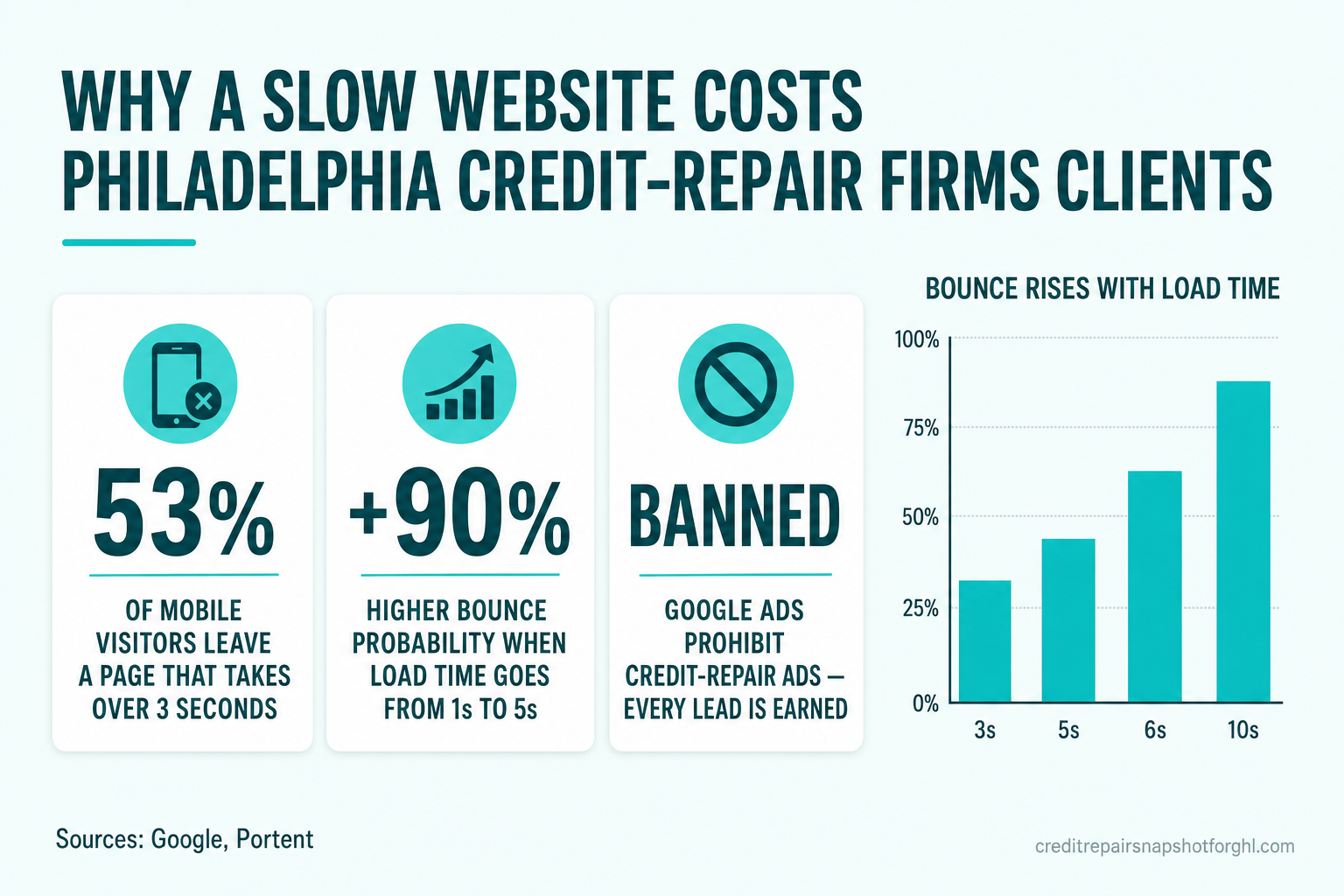
If you run a credit-repair firm in Philadelphia, your website has one job: turn a nervous stranger with damaged credit into a booked consultation before they hit “back” and call the next firm on the list. A slow site fails that job silently. There’s no error message — just a prospect who left, a lead you paid to earn (with SEO, referrals, or social, since you can’t buy them with ads), and a booking that never happened.
The fix is measurable and mostly mechanical. Google now grades every page on three “Core Web Vitals” — how fast the main content loads (LCP), how quickly the page responds to a tap (INP), and how much it jumps around while loading (CLS) — and a page is “good” only at LCP ≤ 2.5s, INP ≤ 200ms, and CLS ≤ 0.1 (web.dev). This playbook walks a non-technical owner through exactly how to measure those numbers on your current site and the seven steps to fix them — plus the honest answer to when it’s cheaper to rebuild than to patch.
Table of contents
- The one-sentence answer
- Why website speed decides the lead in Philadelphia
- What “fast” actually means now: Core Web Vitals
- What slow really costs you
- The 7-step Core Web Vitals playbook
- When to patch vs. when to rebuild
- Frequently asked questions
- About the author
- Sources
The one-sentence answer
To fix a slow credit-repair website, measure your real Core Web Vitals in PageSpeed Insights, then work the biggest wins in order — compress and pre-load the largest image (LCP), strip page-builder JavaScript, reserve space for images and embeds so nothing shifts (CLS), defer heavy scripts so taps respond fast (INP), and serve static-first pages from a CDN — aiming for LCP ≤ 2.5s, INP ≤ 200ms, and CLS ≤ 0.1. Everything below is the how, with the data behind it.
One compliance note first: this is about your operations, not your offer. A faster site helps you capture and book more of the leads you already earn. It says nothing about credit outcomes, and neither should your marketing — describe process and effort, never a promised deletion or score change.
Why website speed decides the lead in Philadelphia
Every business wants a fast site. For a Philadelphia credit-repair firm, speed is disproportionately valuable for three specific reasons.
- Your traffic is earned, so you can’t afford to waste it. Google’s advertising policy prohibits credit-repair services from running ads at all (Google Ads policy). You can’t paper over a slow, leaky site by buying more clicks — every visitor arrives from organic search, a referral partner, or social, at real cost. A prospect who bounces off a 6-second homepage is money you already spent, gone.
- Almost everyone arrives on a phone. Roughly 60% of global web traffic is now mobile (StatCounter) — and for a consumer-finance service people research quietly and on the go, mobile share is typically higher still. Mobile networks and mid-range phones are exactly where a bloated page feels slowest.
- The audience is anxious and comparison-shopping. Someone searching “fix my credit Philadelphia” is often on their third tab, deciding in seconds who looks legitimate and responsive. A slow, janky page reads as “fly-by-night” at the precise moment they’re deciding whether to hand you their financial information.
The demand is real and large — which is exactly why dropping a lead hurts. In 2024 the CFPB logged more than 2.8 million consumer complaints, roughly 85% of them about credit or consumer reporting (CFPB, 2024), and the FTC’s landmark study found 1 in 5 consumers had an error on at least one credit report (FTC, 2013). People are looking for help. Speed decides whether your site is the one that catches them. (It’s the same reason booking and speed-to-lead systems matter so much in this niche.)
What “fast” actually means now: Core Web Vitals
“Fast” isn’t a feeling anymore — Google defines it with three field metrics called Core Web Vitals, scored on real visitors at the 75th percentile.
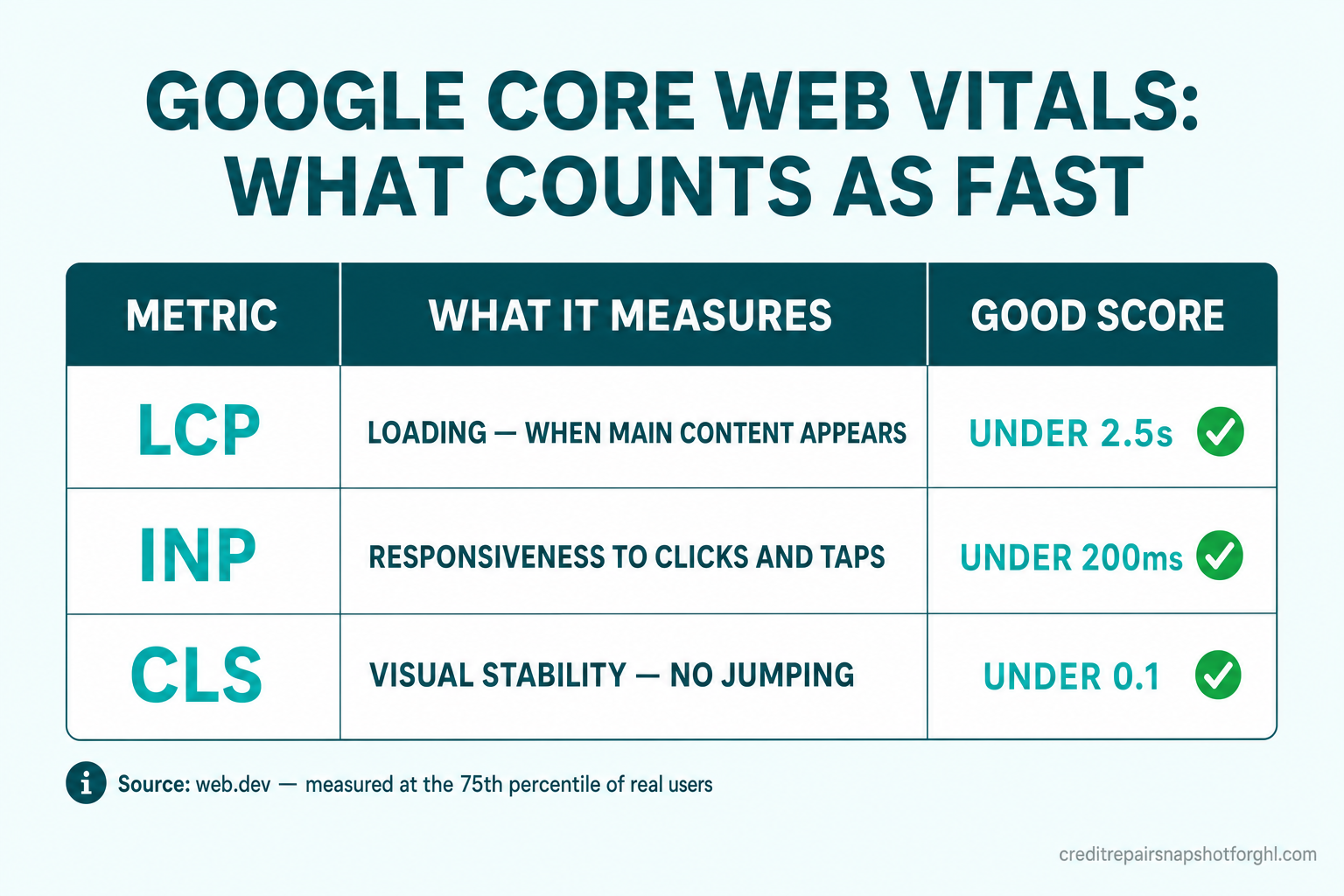
- LCP — Largest Contentful Paint (loading). How long until the biggest thing on screen — usually your hero image or headline — is painted. Good is ≤ 2.5 seconds.
- INP — Interaction to Next Paint (responsiveness). How quickly the page reacts when someone taps a button or opens your menu. INP replaced FID on March 12, 2024, and good is ≤ 200 milliseconds (web.dev).
- CLS — Cumulative Layout Shift (visual stability). How much the page jumps as it loads — the maddening moment a “Book a consult” button slides down just as a thumb comes down on it. Good is ≤ 0.1.
What slow really costs you
The link between speed and lost business is one of the most-studied findings in web performance. Three numbers make it concrete.
First, slow pages get abandoned before they load. Google’s mobile research found that 53% of mobile site visits are abandoned if a page takes longer than 3 seconds (Google, 2016). Half your hard-earned mobile traffic can vanish before your offer even renders.
Second, bounce probability climbs steeply with every second. Google/SOASTA modeling on millions of mobile pages found that as load time grows, the probability a visitor bounces rises sharply.
Third, faster pages convert more of the people who stay. Portent’s analysis of 100M+ pageviews found that a site loading in 1 second converts at roughly 3× the rate of one loading in 5 seconds — 3.05% vs. 1.08% for e-commerce, with the highest conversion rates in the 0–4 second range (Portent). And Deloitte’s Milliseconds Make Millions study found that even a 0.1-second improvement in mobile speed moved conversion metrics measurably — for lead-generation journeys specifically, progression to form submission rose +21.6% (Deloitte, 2020).
For a firm booking consultations, that “form submission” is your consult request. Speed isn’t cosmetic — it’s the difference between the lead you earned turning into a booked call or a bounce.
The 7-step Core Web Vitals playbook
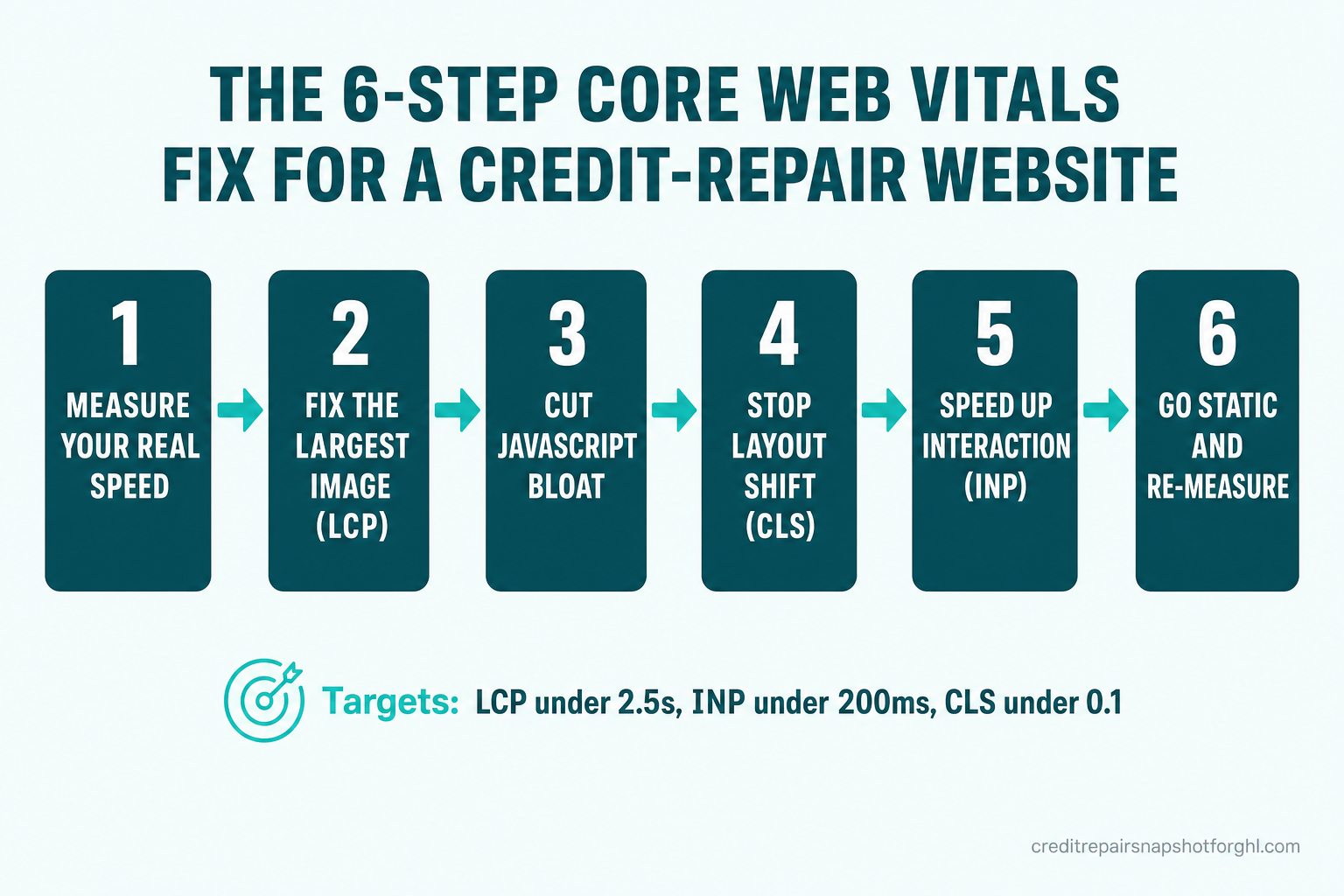
Here’s the order of operations. Work top to bottom; the early steps deliver the biggest gains for the least effort.
Step 1 — Measure your real speed (don’t guess)
Run your homepage and your top service page through Google PageSpeed Insights. It reports two things: lab data (a simulated load) and, more importantly, field data — the Core Web Vitals of your actual visitors over the last 28 days. Write down your LCP, INP, and CLS on mobile (not desktop — that’s where your traffic is). Those three numbers are your baseline; you’ll re-run this at the end to prove the fix worked.
Step 2 — Fix the largest image (your LCP)
On most credit-repair sites the Largest Contentful Paint element is the hero image or a big banner. Three fixes, in order:
- Compress and resize it. A 2 MB hero shot has no business on a phone. Export it under ~200 KB and serve modern formats (WebP/AVIF).
- Size it correctly. Don’t ship a 3000px image into a 400px slot; serve responsive sizes.
- Preload it and stop lazy-loading it. The hero should load first, not last — the opposite of below-the-fold images.
LCP is usually where the single biggest second is hiding.
Step 3 — Cut the JavaScript bloat
This is where platform choice bites. WordPress with a page builder (Elementor, Divi), Wix, and even GoHighLevel-built pages ship a lot of JavaScript your brochure site never needed — sliders, animation libraries, chat widgets, tracking tags, and plugin code that all has to download, parse, and run before the page feels ready. Audit it:
- Remove plugins and embeds you don’t use. Every one is a tax.
- Load third-party scripts (chat, analytics, pixels) asynchronously or deferred, not render-blocking in the
<head>. - Question your page builder. Much of the weight is the builder itself, not your content.
Step 4 — Stop the layout from shifting (CLS)
Layout shift is the page jumping as it loads. The usual culprits and fixes:
- Images and video without dimensions. Always set explicit
widthandheight(or an aspect-ratio box) so the browser reserves the space. - Embeds and iframes (booking calendars, chat widgets) that pop in late — give them a reserved container.
- Web fonts that reflow text when they swap in — use
font-display: swapwith a matched fallback.
CLS is often the cheapest vital to fix and the most jarring for users when it’s broken.
Step 5 — Speed up interaction (INP)
INP measures how fast the page responds when someone taps. Sluggish taps almost always trace back to too much JavaScript running on the main thread (see Step 3). Beyond trimming scripts: break up long tasks, avoid heavy work on page load, and lazy-load anything below the fold so the browser isn’t busy when a thumb lands on your “Book a consult” button.
Step 6 — Go static-first and serve from the edge
The most durable speed win is architectural: serve pre-built, static HTML from a global CDN instead of generating each page on a server (or in a heavy client-side app) on every visit. Static-first frameworks like Astro ship almost no JavaScript by default and serve pages from the edge, which is why a purpose-built static site routinely scores 90+ on PageSpeed where a comparable WordPress/Wix/GHL page struggles. This is the difference between patching a slow platform forever and removing the bottleneck. (We go deeper on the trade-offs in Astro vs. GoHighLevel websites for credit-repair firms.)
Step 7 — Re-measure, then hold the line
Re-run PageSpeed Insights on the same pages and compare against your Step 1 baseline. Field data updates over ~28 days, so lab data confirms the fix immediately while field scores catch up. Then keep the budget: every new plugin, pixel, or 4 MB image is a chance to slide back. Fast is a state you maintain, not a project you finish.
When to patch vs. when to rebuild
Not every slow site needs a rebuild. Use this rule of thumb:
- Patch if your site is fundamentally sound — a clean theme, a few too many images, one heavy plugin. Steps 2–5 will often get you under the thresholds in an afternoon.
- Rebuild if you’re fighting the platform: a page-builder site that re-bloats every time you edit it, mobile LCP stuck above 4 seconds no matter what you compress, or a stack where every “fix” needs a developer and a plugin. At that point you’re paying — in lost leads and dev hours — for the privilege of staying slow.
For most Philadelphia credit-repair firms, the honest answer is that a lean, static-first site is cheaper over a year than perpetually patching a heavy one — especially when you factor in the leads a slow site is quietly losing every week.
Frequently asked questions
What is a good page speed for a credit-repair website?
Google grades pages on three Core Web Vitals: Largest Contentful Paint (LCP) should be 2.5 seconds or less, Interaction to Next Paint (INP) 200 milliseconds or less, and Cumulative Layout Shift (CLS) 0.1 or less — all measured on real mobile visitors. Hitting all three on mobile is the practical bar for 'fast enough to convert' in 2026.
How much does a slow website actually cost a credit-repair firm?
More than most owners realize, because the loss is invisible. Google found 53% of mobile visits are abandoned if a page takes over 3 seconds to load, and bounce probability rises about 90% as load time goes from 1 to 5 seconds (Think with Google, 2017). Since Google Ads prohibits credit-repair advertising, every visitor is earned through SEO, referrals, or social — so a lead lost to a slow page is money you already spent, gone.
Why is my WordPress, Wix, or GoHighLevel site slow?
Usually JavaScript bloat. Page builders like Elementor and Divi, plus Wix and GHL-built pages, ship sliders, animation libraries, plugins, and tracking scripts that must download and run before the page feels ready. A credit-repair brochure site doesn't need most of it. You can trim it (defer scripts, remove plugins, compress images), but on a heavily plugin-dependent platform you're often patching an architecture that keeps re-bloating.
Can I fix my site speed myself, or do I need a developer?
Several steps are DIY-friendly: measure in PageSpeed Insights, compress and correctly size your hero image, remove unused plugins and embeds, and set width/height on images to stop layout shift. Deeper fixes — deferring third-party scripts, reducing main-thread work for INP, or moving to a static-first architecture — usually need a developer or a rebuild. Start with the free measurement and the image fixes; they're the highest-return, lowest-skill wins.
Does making my website faster help it rank on Google and in AI answers?
Yes. Core Web Vitals are part of Google's page-experience signals, so a faster site helps rankings — which matters enormously for a niche that can't buy ads. Clean, fast, well-structured pages are also easier for AI answer engines to crawl and cite. See our guide on AI search optimization for credit-repair firms for the AEO/GEO side. Speed helps discovery; it never lets you promise a credit outcome.
Will a faster website let me promise better credit results?
No. Speed is an operational improvement — it helps you capture and book more of the leads you already earn. It says nothing about credit outcomes. Your marketing must describe process and effort, never promise a deletion or a score increase, and your firm remains the credit-repair organization responsible for CROA compliance.
About the author
Marcus Pennington is a retention and recurring-revenue consultant who advises credit-repair business owners and the GoHighLevel agencies that serve them. A former SaaS churn analyst, he reverse-engineers where firms quietly lose money — including the leads a slow website drops before a consult is ever booked. Marcus is a fictional editorial persona used for authorship attribution; his articles are operational guidance, not legal or financial advice.
Related reading
- Astro vs. GoHighLevel Websites for Credit-Repair Firms: Page Speed Compared
- AI Search Optimization (AEO/GEO) for Credit-Repair Firms
- Credit Repair SEO: How to Rank Without Running Ads
- Cut No-Shows in Credit Repair: A Consultation Booking System
- 2026 Credit Repair Industry Statistics
Sources
- web.dev — Web Vitals (Core Web Vitals thresholds) — LCP ≤ 2.5s, INP ≤ 200ms, CLS ≤ 0.1 at the 75th percentile of real users.
- web.dev — INP becomes a Core Web Vital (March 12, 2024) — INP replaced FID as a Core Web Vital.
- Think with Google — Mobile page speed new industry benchmarks (2017) — bounce probability rises +32% (3s), +90% (5s), +106% (6s), +123% (10s) vs. a 1s load.
- Google — The need for mobile speed (2016) — 53% of mobile visits abandoned if load > 3 seconds.
- Deloitte — Milliseconds Make Millions (2020) — a 0.1s mobile speed gain raised lead-gen progression to form submission by +21.6% (and retail conversions +8.4%).
- Portent — Site Speed Is (Still) Impacting Your Conversion Rate — a 1s site converts ~3× a 5s site (3.05% vs 1.08%, e-commerce).
- StatCounter — Desktop vs Mobile vs Tablet market share — ~60% of global web traffic is mobile.
- Google Ads — Credit repair services policy — ads for credit-repair services are not allowed.
- CFPB — 2024 Consumer Response Annual Report — 2.8M+ complaints; ~85% about credit/consumer reporting.
- FTC — Study of Credit Report Accuracy (2013) — 1 in 5 consumers had a credit-report error.
Credit Repair Snapshot for GHL is a GoHighLevel automation product. We are not a credit repair organization, law firm, or credit bureau, and we do not dispute items, repair credit, or provide credit, legal, or financial advice. You remain responsible for CROA and TCPA compliance. Results vary; we make no promise that any item will be removed or that any score will improve.