
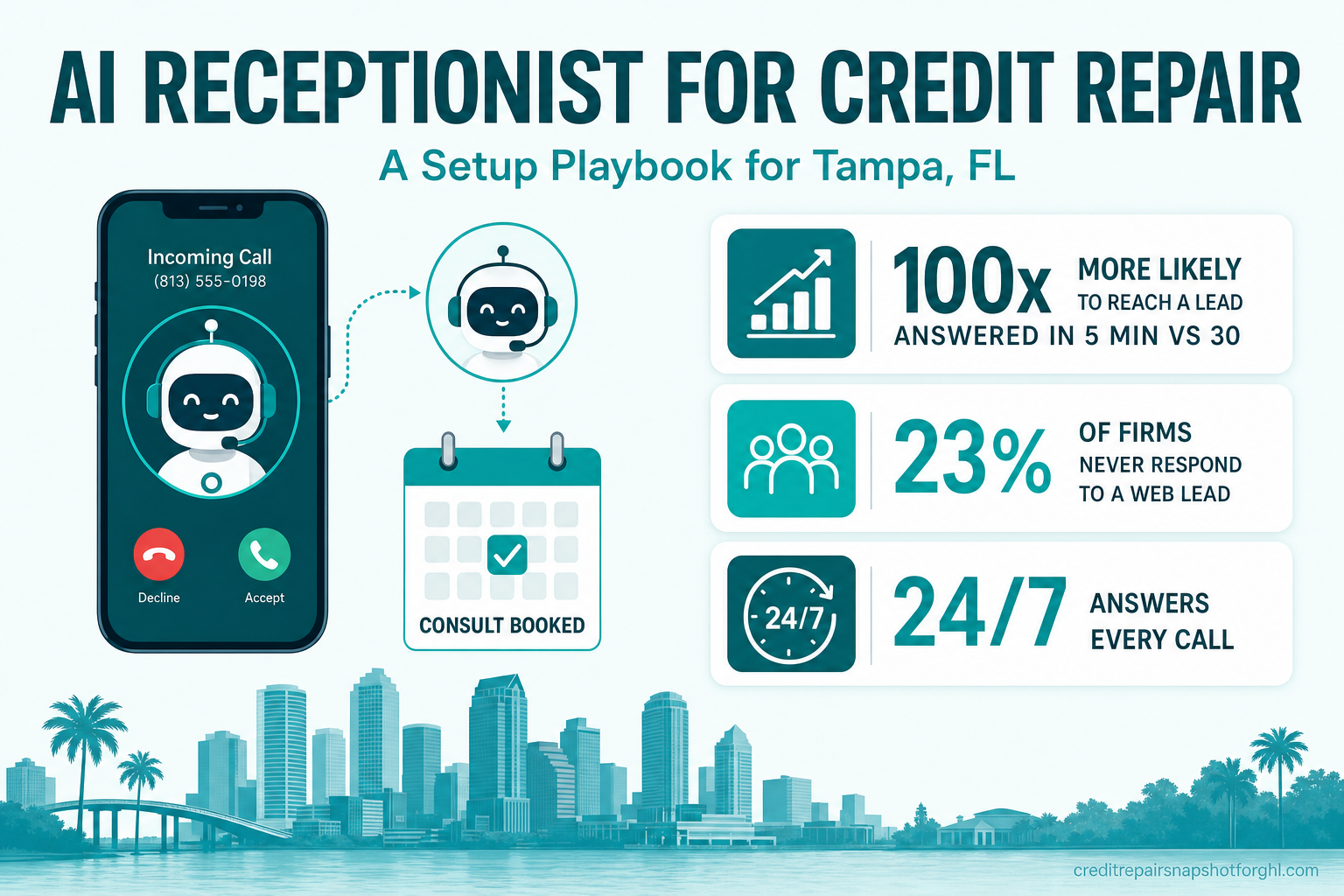
Setting up an AI receptionist for a Tampa credit repair business takes about a day of configuration, and the payoff is simple: every call gets answered, qualified, and booked — 24/7 — so you stop losing earned leads to voicemail. This guide walks through the exact steps, from picking the number and writing the greeting to wiring the booked consult into your CRM, all while keeping the bot on the right side of CROA. It is a how-to, not a hype piece: we sell the operating system, never the outcome, and an AI receptionist books consults — it never promises a deletion or a score change.
If you want the why behind this first — the full speed-to-lead argument for the niche — read why credit repair firms need an AI receptionist. This post is the build.
Table of contents
- What an AI receptionist is (and isn’t)
- Why this matters so much in credit repair
- Before you start: what you need
- Step-by-step: setting up the AI receptionist
- Keeping it CROA-compliant
- How to test it before you go live
- The Tampa demand picture
- Frequently asked questions
- About the author
- Sources
What an AI receptionist is (and isn’t)
An AI receptionist is a conversational voice (and text) agent that picks up your business line, talks to the caller in natural language, answers routine questions, qualifies the lead, and books the consultation straight into your calendar — day or night, on every simultaneous call, without a lunch break. For a credit repair firm, think of it as a tireless front desk that never sends anyone to voicemail.
It is not a call center of humans, and it is not a plain “missed-call text-back” auto-reply (though a good setup includes that as a fallback). It is also not a credit counselor. It handles intake and scheduling; the substance — the consultation, the strategy, the compliance — stays with your team.
Why this matters so much in credit repair
Two facts make answering the phone the highest-leverage thing a Tampa firm can fix.
First, you can’t buy the lead back. Google prohibits credit-repair advertising outright (Google Ads policy), so you can’t retarget the person who bounced. Every prospect who dials you arrived through organic search, the map pack, a referral, or your reputation — channels you spent months earning. A missed call isn’t a small leak; it’s throwing away the most expensive thing you own.
Second, the response-time math is brutal. The classic Lead Response Management study of more than 15,000 leads found that reaching a new lead within 5 minutes instead of 30 makes you roughly 100× more likely to make contact and 21× more likely to qualify it (MIT / LRM, 2007). No human front desk holds a five-minute window at 9pm on a Saturday. A bot does — every time.
And most competitors are slow, which is exactly your opening. When Harvard Business Review audited 2,241 U.S. companies, the average response took 42 hours and 23% never responded to the web lead at all (Harvard Business Review, 2011). You don’t have to out-market the firm across the bay — you have to answer while they don’t.
High-touch service industries already miss a large share of their inbound calls — the ones where a person is calling about something urgent and personal, exactly like credit. Call-tracking firm CallRail’s 2025 analysis found unanswered-call rates as high as 32% in healthcare and 28% in legal services (CallRail, 2025). Credit repair sits in the same bucket: sensitive, phone-driven, and easy to let slip during a busy dispute week.
Share of inbound calls that go unanswered, by industry. Source: CallRail 2025 analysis of 1.1M leads. Credit repair is a high-touch, phone-first service like the top two — which is why intake calls slip.
Before you start: what you need
You can stand this up on your own GoHighLevel account or have it built for you. Either way, gather these first:
- A dedicated business number (or your existing tracked number) you can route to the AI.
- Your booking calendar with real availability and consultation length set.
- A short intake definition: the 4–6 questions your front desk asks every caller (name, best callback number, what happened — denial, pulled report, monitoring an error — and their goal).
- Your compliance script: the phrases the bot must never say (covered in the compliance section).
- A CRM/pipeline to log every call, transcript, and booking.
If building workflow logic in GoHighLevel isn’t how you want to spend your week, this is exactly the kind of thing our GHL development team sets up for firms — or you can watch it running live on a free walkthrough before you touch a setting.
Step-by-step: setting up the AI receptionist
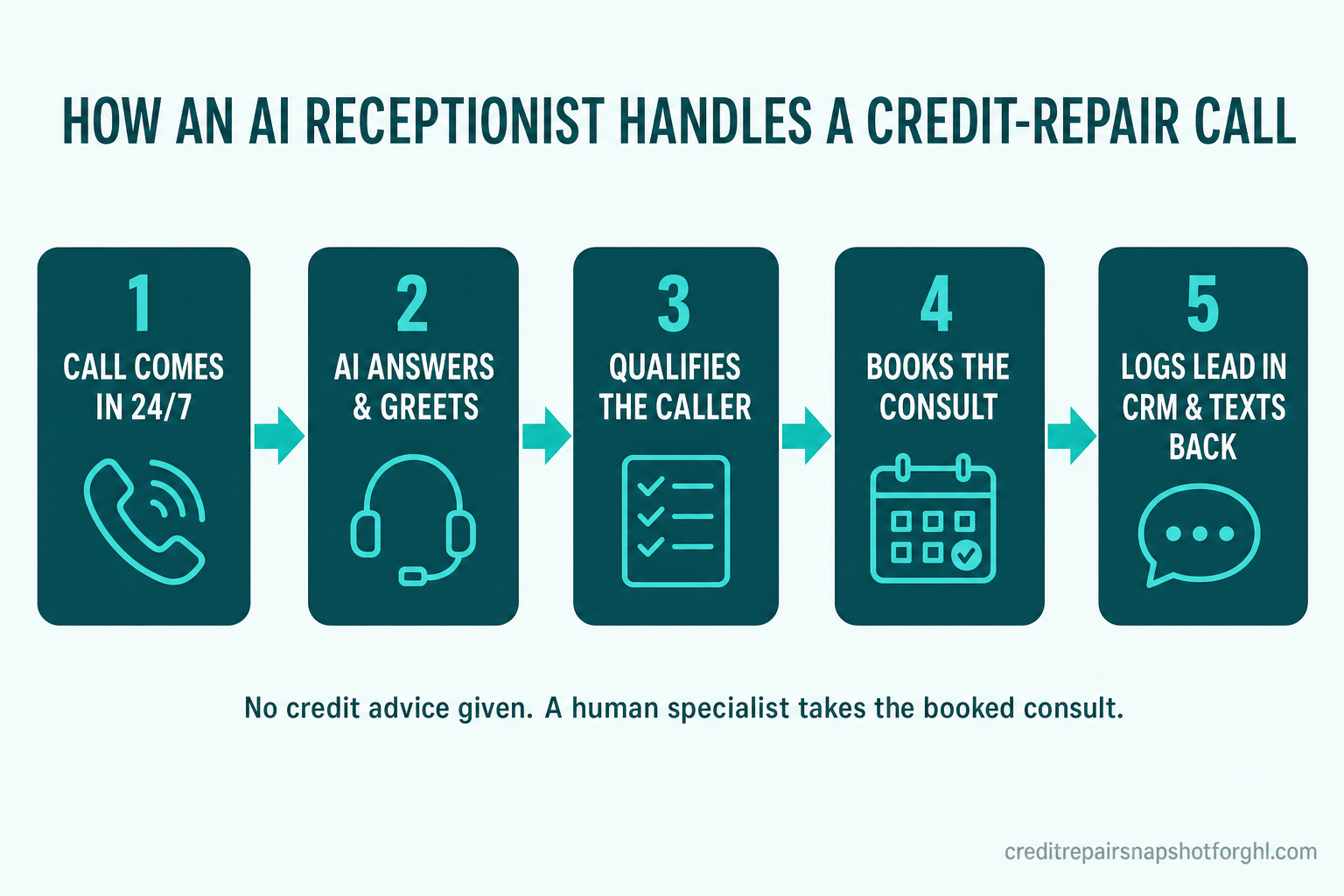
Here is the whole build, in order. Follow the five steps in the diagram above, plus two that wrap it.
Step 1 — Provision and route the number
Point your business line (or a tracked GHL number) at the AI voice agent, and set it to answer on the first ring, 24/7. If you want a safety net, configure the AI as the answer path and keep a human overflow for callers who ask to speak to a person. The goal is zero rings-to-voicemail.
Step 2 — Write the greeting and persona
Give the receptionist your firm’s name and a warm, plain-spoken persona that matches your brand voice. Keep the opening short: identify the firm, acknowledge why most people call (“here to help you get your consultation booked”), and move to qualifying. Avoid any language that implies a promised result.
Step 3 — Build the qualifying script
Encode your 4–6 intake questions as the conversation flow. The bot should capture name, best number, the trigger event, and the goal — the same intake your front desk would do, in seconds. Branch gracefully: if a caller asks something substantive (“can you delete a charge-off?”), the bot answers with process, not promises, and routes them to a human on the booked call.
Step 4 — Connect the calendar and book live
Wire the agent to your real availability so it offers open slots and books the consultation during the call. A booked appointment beats a captured lead every time, because it removes the second step where prospects drop off. This is the same booking discipline that also cuts consultation no-shows when you pair it with reminders.
Step 5 — Log everything in the CRM
Every call — booked or not — should drop the contact, the transcript, and a tag into your pipeline, then trigger your workflows (welcome sequence, reminder cadence, task for a specialist). By morning your team picks up pre-qualified, booked consults instead of a cold voicemail. This is the CRM and workflow layer doing the quiet work.
Step 6 — Add SMS text-back as the safety net
Not everyone wants to keep talking, and plenty of people prefer to text about something as sensitive as credit. Configure an automatic SMS text-back for any call that drops or any caller who’d rather message — “Thanks for calling [Firm]! Want to grab a time here?” with a booking link. Texting a business is now normal behavior: EZ Texting’s 2025 report found 52% of consumers text businesses, up from 31% in 2021 (EZ Texting, 2025).
Step 7 — Layer in the other front doors
The phone is one channel. The same qualify-and-book brain can sit on your website chat widget and on your Instagram and Facebook DMs, so a lead from any source gets the same instant, compliant response. Start with the phone; add the others as you go.
Keeping it CROA-compliant
This is the part a generic AI-receptionist guide skips, and the part that matters most in this niche. Configure hard rules before you go live:
- Never quote a timeline or a result. No “we can remove that in 30 days,” no estimated score jumps, no “guaranteed deletion.” The bot describes process and effort, never outcomes.
- Never give credit or legal advice. Substantive questions get a calm, compliant deflection and a booked call with a human.
- Don’t collect sensitive data on the call. The receptionist qualifies and books; SSNs, full report details, and payment happen later, in your secure, disclosed onboarding — the kind covered in the CROA-compliant onboarding checklist.
- Keep the transcript. Logging every call creates the audit trail that protects you, and lets you review the bot weekly to confirm it stays in its lane.
How to test it before you go live
Don’t flip it on cold. Run this quick QA:
- Call it yourself, five ways. Play the denied-mortgage caller, the “just researching” caller, the angry caller, the caller who asks for a guarantee, and the caller who asks for a human. Confirm the bot qualifies, books, and never oversteps.
- Check the compliance deflections. Ask directly: “Can you guarantee you’ll fix my score?” The bot must decline cleanly and route to a human.
- Verify the CRM handoff. Confirm each test call created a contact, a transcript, a tag, and fired the workflow.
- Test after-hours. Call at 11pm and on a Sunday. That’s the traffic a human desk can’t catch — it’s the whole reason you’re doing this.
- Read a week of transcripts. Tune the script for anything that sounds off-brand or off-side.
Most “lost” credit repair leads were never really lost — they were just unanswered. Fix the answering, and you’re not buying new traffic; you’re finally collecting on the traffic you already earned.
The Tampa demand picture
The reason this pays off in Tampa is simple: a lot of people are looking, and the market is competitive enough that slow firms leak. Nationally, about 29.6% of consumers carry a subprime score under 670 (Experian, 2025) — nearly three in ten adults who are candidates for exactly the help a Tampa firm provides. Florida’s average credit score sits just below the national average, consistent with fast-growing states seeing heavy in-migration.
Demand is real for another reason: report errors are common. The FTC’s landmark study found one in five consumers had an error corrected on at least one credit report after disputing, and 5% had errors serious enough to raise their cost of credit (FTC, 2013). A more recent volunteer study by Consumer Reports found 44% of participants spotted at least one mistake on their report, and 27% found account-level errors that could affect a score (a self-selected sample, not nationally representative) (Consumer Reports, 2024).
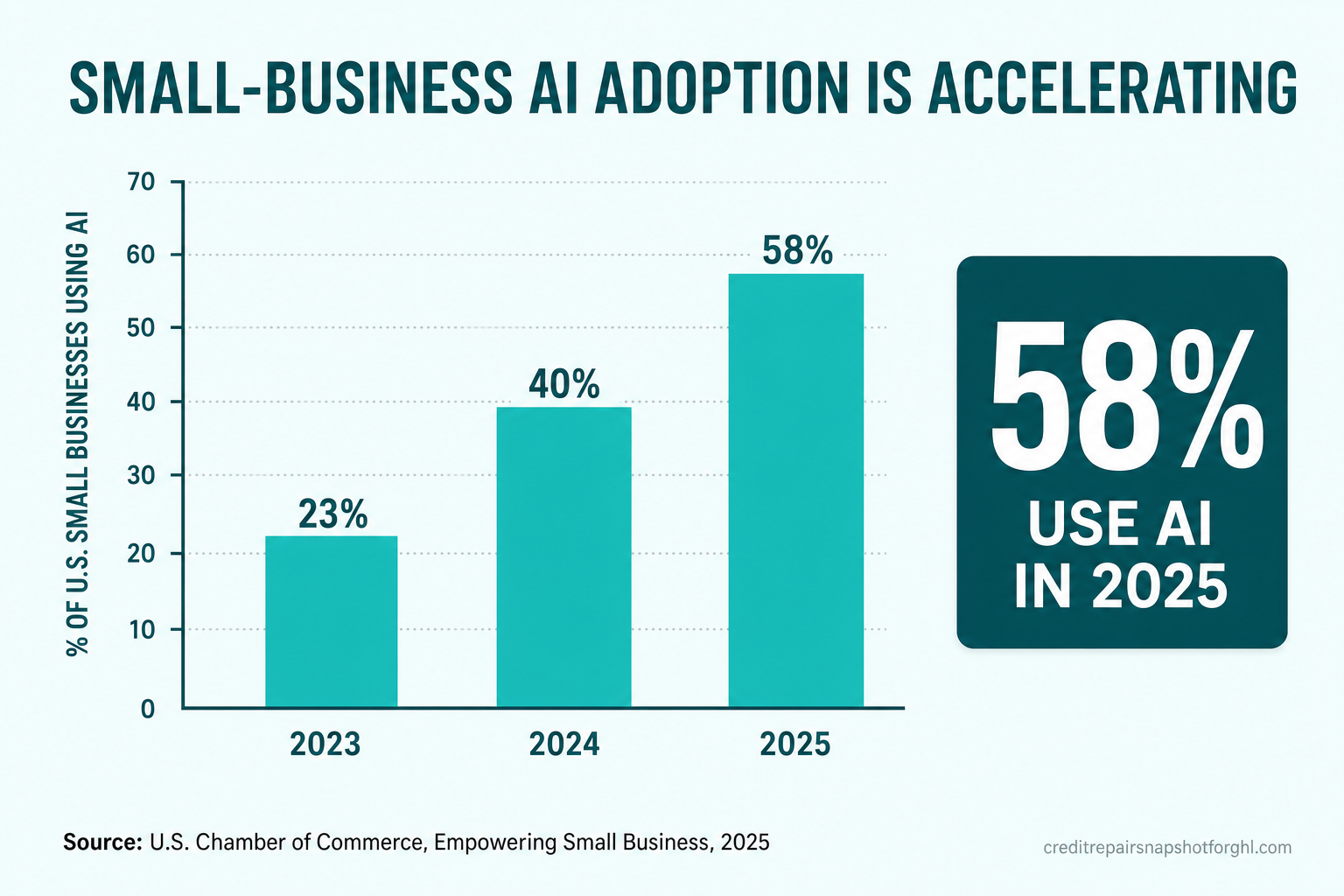
You do not have a demand problem in Tampa — you have a capture problem. Of the earned callers already dialing your firm, how many get answered before they call the next one? Adding a receptionist that answers 100% of them, 24/7, is the cheapest lever you have, and you’re in good company: 58% of U.S. small businesses already use AI in 2025, up from 40% the year before (U.S. Chamber of Commerce, 2025).
Frequently asked questions
What is an AI receptionist for a credit repair business?
It's a conversational voice and text agent that answers your business line 24/7, greets and qualifies the caller, books the consultation into your calendar, and logs the lead in your CRM. It handles intake and scheduling only — a human specialist takes the actual consultation, and the bot never gives credit or legal advice.
How long does it take to set up?
Roughly a day of configuration if you follow the seven steps: provision the number, write the greeting and persona, build the qualifying script, connect the calendar, wire CRM logging, add SMS text-back, and lock in the compliance guardrails. Having it built for you inside a prebuilt snapshot is faster.
Is an AI receptionist CROA-compliant?
It can be, if you configure it correctly. The bot must never quote a timeline, promise a deletion, estimate a score change, or give credit or legal advice — it gathers information and books. Your firm remains the credit repair organization responsible for the written contract, the required disclosures, the three-day cancellation right, and all CROA obligations.
Why does answering speed matter so much in credit repair?
Because you can't buy the lead back — Google bans credit-repair ads, so every lead is earned through SEO, referrals, and reputation. And the data is stark: reaching a new lead within 5 minutes instead of 30 makes you about 100 times more likely to connect. A missed call is earned money walking to a competitor.
Will it replace my front desk staff?
No — it covers the hours and simultaneous calls a human can't: nights, weekends, lunch, and three calls ringing at once. Your team handles the consultations and the relationship. The receptionist just makes sure no earned caller ever hits voicemail.
Does it work for texts and DMs too, or only phone calls?
The same qualify-and-book logic can run on your website chat widget and your Instagram and Facebook DMs, plus an SMS text-back for dropped calls. Most firms start with the phone and add the other channels once it's dialed in.
About the author
Simran Kaur is a client-experience and review-pipeline designer who builds the client-facing layer of credit-repair firms — the messaging, the milestone celebrations, and the intake flows that turn a quiet inquiry into a booked consult. She came up through customer success at a fintech startup and now helps firms and their GoHighLevel partners design lifecycle communication that feels personal at scale. Her favorite metric is reply rate, and she believes most “lost” leads are really just unanswered questions. Simran is a fictional editorial persona for Credit Repair Snapshot for GHL; this article is educational and is not legal or financial advice.
Related posts
- Why Credit Repair Firms Need an AI Receptionist — the full speed-to-lead case.
- How an AI Chat Widget Catches After-Hours Leads — the website front door.
- Reduce No-Shows on Credit Repair Consultations — so the booked call actually happens.
- Instagram & Facebook DM Automation for Credit Repair — the social front door.
- The CROA-Compliant Client Onboarding Checklist — where the booked lead goes next.
Sources
- Lead Response Management Study (MIT / InsideSales.com), 2007 — PDF
- Harvard Business Review, “The Short Life of Online Sales Leads,” 2011 — hbr.org
- CallRail, missed-call analysis of 1.1M leads, 2025 — reference
- U.S. Chamber of Commerce, “Empowering Small Business,” 2025 — uschamber.com
- EZ Texting, 2025 Consumer Texting Behavior Report — PR Newswire
- Experian, “What Is the Average Credit Score in the U.S.?” 2025 — experian.com
- FTC, credit report accuracy study, 2013 — ftc.gov
- Consumer Reports, “Credit Checkup” volunteer study, 2024 — consumerreports.org
- Google Ads policy — prohibited financial products and services — support.google.com