GHL pipeline design for enrolment boards
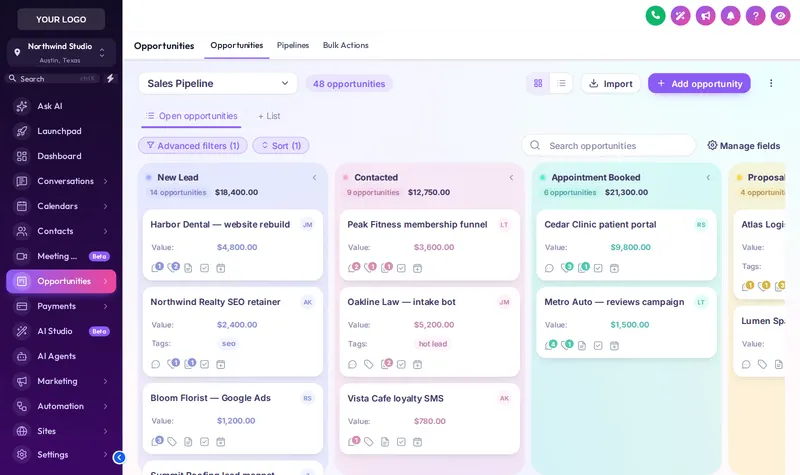
GHL pipeline design restyles the GoHighLevel opportunities board so every stage has its own colour, cards are easier to scan and deal values stand out, without touching your pipelines or automations.
Illustrative stages. Colours follow column position, so your own stage names work the same way.
Restyle a GoHighLevel opportunities board
Click a design and the sample board changes. Scroll the board sideways to see every stage, and switch the sidebar to test it against your theme.
When every stage looks the same, files slip
On the stock board, a client stuck in the cancellation window looks exactly like one ready to start. Processors scan every card to find what needs action. Distinct stage colours, clearer cards and bold values make the board readable at a glance, which is what a busy credit repair team needs on Monday morning.
Columns, cards and the toolbar
Stage columns
Headers as cards, tinted or underlined, with deal counts as text or a badge.
Deal cards
Stage colour as a stripe or dot, three densities and a hover that never moves the card.
Values and fields
Deal value in bold in the stage colour, with your own colours for names and labels.
Toolbar
Pipeline picker, filters and search in soft, pill, glass, outline or bold style.
Four steps
- Pick a board designIn the pipeline designer, choose one of 12 designs, the same ones in the preview; our default demo is Candy Pastel.
- Set stage coloursKeep the template’s colours, build them from your brand colour, or pick each one. They follow column position, not stage names.
- Tune the cardsCard density, stripe or dot for the stage colour, and how deal values and fields are shown.
- SaveEvery sub-account board picks up the design on its next page load, with no re-install. No pipeline settings change.
From Score Builder
GHL pipeline design questions
Yes. The customizer colours each column by position: the first stage gets the first colour, the second the next, repeating after the last. Every pipeline in every sub-account picks them up, whatever its stages are called.
No. It only changes how the opportunities board looks in the browser. Pipelines, stages, deals and the workflows that move them stay exactly as they are.
Yes. Cards never move on hover and GoHighLevel’s own drag and drop is kept, so moving a client from Agreement sent to Docs collected works as before.
It can be. The table behind GoHighLevel’s list toggle can follow the same design. The preview on this page shows the board view.
That is your process, not ours, but most firms track consultation, agreement sent, the cancellation window, documents collected, active client and review request. The design makes whichever stages you use easy to tell apart.
Yes. Board and dashboard templates share families, and both can build their colours from your brand colour.
Yes. 2 of the 12 designs are dark, with light text on dark columns and cards.
Score Builder at $487 and above unlock the pipeline designer with all 12 designs.
No. You choose and tune the design yourself in the live editor. You customize and install it yourself. Help docs and our support team are there if you get stuck.
Explore the other modules
Every module lives in the same GHL White-Label Customizer account. Compare what each package unlocks on the customizer pricing page.
A board your processors can read in seconds
Score Builder unlocks the pipeline designer along with the dashboard designer, mega menus and contact actions.
Runs on the GHL Customer Care customizer platform. GoHighLevel and HighLevel are trademarks of their owner; this is an independent product, not affiliated with or endorsed by HighLevel. GHL White-Label Customizer changes how GoHighLevel looks for your team and clients; it does not change your data, workflows or CROA obligations, and nothing on this page is credit, legal or financial advice. Prices last updated 2026-10-02.