GHL contact action buttons: six clicks become one tap
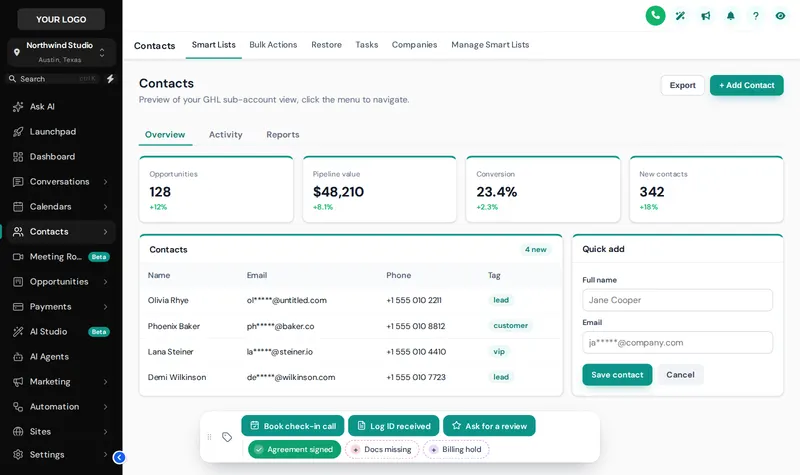
GHL contact action buttons add a bar of quick tags, workflow buttons and short forms to every GoHighLevel contact, so a processor marks “agreement signed” or logs ID received in one tap.
- Open contact
- Find tags field
- Type tag name
- Pick from list
- Confirm
- Check workflow fired
One tap. The tag is added, the workflow starts and the chip turns on.
Tap GoHighLevel quick tags on a sample client
Tap a chip, open the Log ID received form, or drag the bar by its grip. Switch chip colours and positions on the left.
Actions your team repeats fifty times a day
Agreement signed
One chip starts your onboarding workflow and the cancellation-window reminder you already built.
Documents received
A short form records which ID and proof of address arrived, straight into custom fields.
Billing on hold
Toggle a tag that pauses billing reminders, and toggle it off again when resolved.
Ask for a review
One press queues your review request workflow for a happy client.
How to set up your contact actions
List the repeat actions
Note the tags and fields your team changes on every client, such as agreement signed, documents missing or billing on hold.
Build chips and buttons
In the editor, quick tags become one-tap chips; actions that start a workflow become buttons; data entry becomes a short pop-up form.
Connect workflows
Each button points at the tag your existing GoHighLevel workflow listens for, or the custom fields a form fills in.
Place and test
Choose one of 6 starting positions, limit it to the right sub-accounts and test every press.
GHL contact action questions
GoHighLevel has no native custom buttons on the contact page. The customizer adds a contact actions bar with quick tag chips, buttons and pop-up forms, set up per sub-account.
Yes. Buttons add, remove or toggle tags, so any workflow with a tag added or tag removed trigger starts from one press. Your workflows themselves are not changed.
Through GoHighLevel’s own API using the signed-in user’s session, the same calls GoHighLevel’s interface makes. A user can only do what their GoHighLevel permissions already allow.
Any custom field in the sub-account: text, paragraph, number, date, drop-down, email, phone or link, each mapped by name, key or id, and optionally required.
It can. A note can be added to the contact saying which tag was added or removed and by whom, or which field changed from what to what. Many firms find that useful for their internal file history.
Yes. Each chip and button can show in every sub-account or only in the ones you list.
No. The preview runs the real bar on a sample contact, but nothing is sent anywhere. Inside GoHighLevel the same presses update the contact.
Score Builder at $487 and above.
No. You set up the chips, buttons and forms yourself in the editor, and can change them any time. You customize and install it yourself. Help docs and our support team are there if you get stuck.
Explore the other modules
Every module lives in the same GHL White-Label Customizer account. Compare what each package unlocks on the customizer pricing page.
Take the clicks out of every client file
Score Builder includes contact actions, plus menus, the dashboard and the pipeline board on top of your theme.
Runs on the GHL Customer Care customizer platform. GoHighLevel and HighLevel are trademarks of their owner; this is an independent product, not affiliated with or endorsed by HighLevel. GHL White-Label Customizer changes how GoHighLevel looks for your team and clients; it does not change your data, workflows or CROA obligations, and nothing on this page is credit, legal or financial advice. Prices last updated 2026-10-02.