GHL dashboard design people want to open
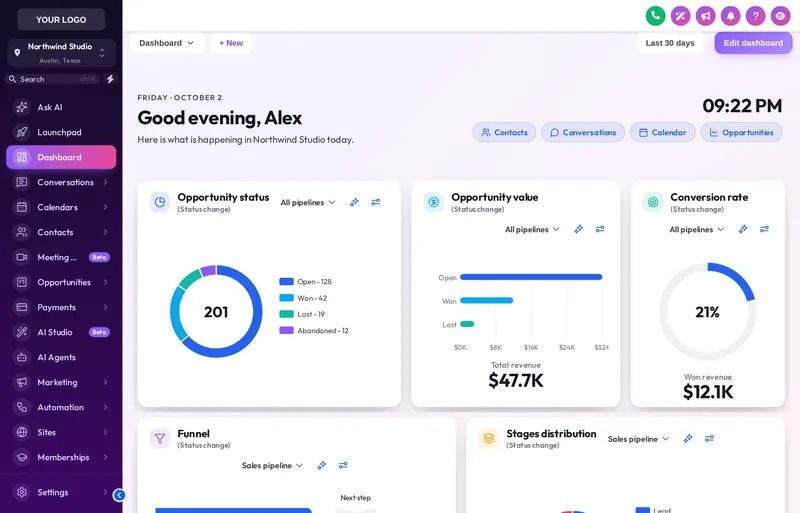
GHL dashboard design restyles the sub-account dashboard with a welcome banner, designed cards and on-brand chart colours, so the page your team and clients land on looks like your firm’s home base.
Try each GoHighLevel custom dashboard
Choose light, dark or photo, then click a design. Change the sidebar to see how it sits next to different themes.
Every part of the landing page
Welcome banner
Name, firm, date, live clock and quick links in gradient, photo, glass or minimal style.
Widget cards
Background, border, radius, shadow and hover, with optional frosted glass or a colour band header.
Charts and numbers
Chart colours by position and big numbers in a colour or gradient.
Particles and backgrounds
Optional dots, network lines, bubbles or stars that stop when the page is left.
A dashboard that frames the day’s work
Morning check-in
Quick links to files waiting on documents and today’s consults, right under the greeting.
Readable stages
Enrolment stages in distinct colours, so a manager sees where files are piling up.
Professional for clients
Where clients see a dashboard, it looks like your firm’s portal, without promising outcomes.
Pick a design
In the dashboard designer, choose one of 18 designs: light, dark or built around a photo.
Write the banner
Set the greeting, a subtitle in your voice and quick links to the pages your team opens most.
Match the charts
Chart colours are set from your brand and handed out by position, so any pipeline fits.
Save
Every sub-account dashboard picks up the design on its next page load through the same line of code as your theme, with no re-install.
Dashboard design starts at Score Builder
GHL dashboard design questions
Yes. The customizer restyles the sub-account dashboard: its cards, charts, big numbers, top bar, background and a welcome banner above the widgets. GoHighLevel’s own widget settings stay in place.
A greeting with the signed-in user’s first name, the sub-account’s name, the date, a live clock and quick links, for example to Client Files, Messages, Consults and Enrolments.
No. It only changes how the dashboard looks. The widgets, their data and GoHighLevel’s dashboard settings stay exactly as they are.
Yes. Colours are given out by position: first colour for the first stage, second for the next. So they fit any pipeline and any number of stages without naming them.
Yes. 6 designs are built around a photo. You can use your own image, with a shade setting so text on top stays readable.
Yes, 3 dark designs with light text on dark cards. They pair well with a dark theme.
Show operational numbers, such as open files, documents outstanding and payments due. Avoid widgets that look like promises about score changes; that keeps the portal in line with CROA-safe language.
Score Builder at $487 and above unlock the dashboard designer with all 18 designs.
No. You pick and adjust the design yourself in the live editor, and can change it any time. You customize and install it yourself. Help docs and our support team are there if you get stuck.
Explore the other modules
Every module lives in the same GHL White-Label Customizer account. Compare what each package unlocks on the customizer pricing page.
Give every sub-account a home page with your name on it
Score Builder unlocks the dashboard designer alongside the pipeline designer, mega menus and contact actions.
Runs on the GHL Customer Care customizer platform. GoHighLevel and HighLevel are trademarks of their owner; this is an independent product, not affiliated with or endorsed by HighLevel. GHL White-Label Customizer changes how GoHighLevel looks for your team and clients; it does not change your data, workflows or CROA obligations, and nothing on this page is credit, legal or financial advice. Prices last updated 2026-10-02.