If you run a credit-repair firm in Seattle, the most expensive tool in your business isn’t the one you pay for — it’s the gap between the tools you pay for. Disputes live in Credit Repair Cloud (or DisputeFox, ScoreCEO, TrackStar, or Client Dispute Manager). Your pipeline lives in a spreadsheet. Client texts and emails live in GoHighLevel. Billing lives in QuickBooks. None of them talk to each other, so a human — usually you — becomes the integration, retyping the same client into four systems and reconciling them by hand every week.
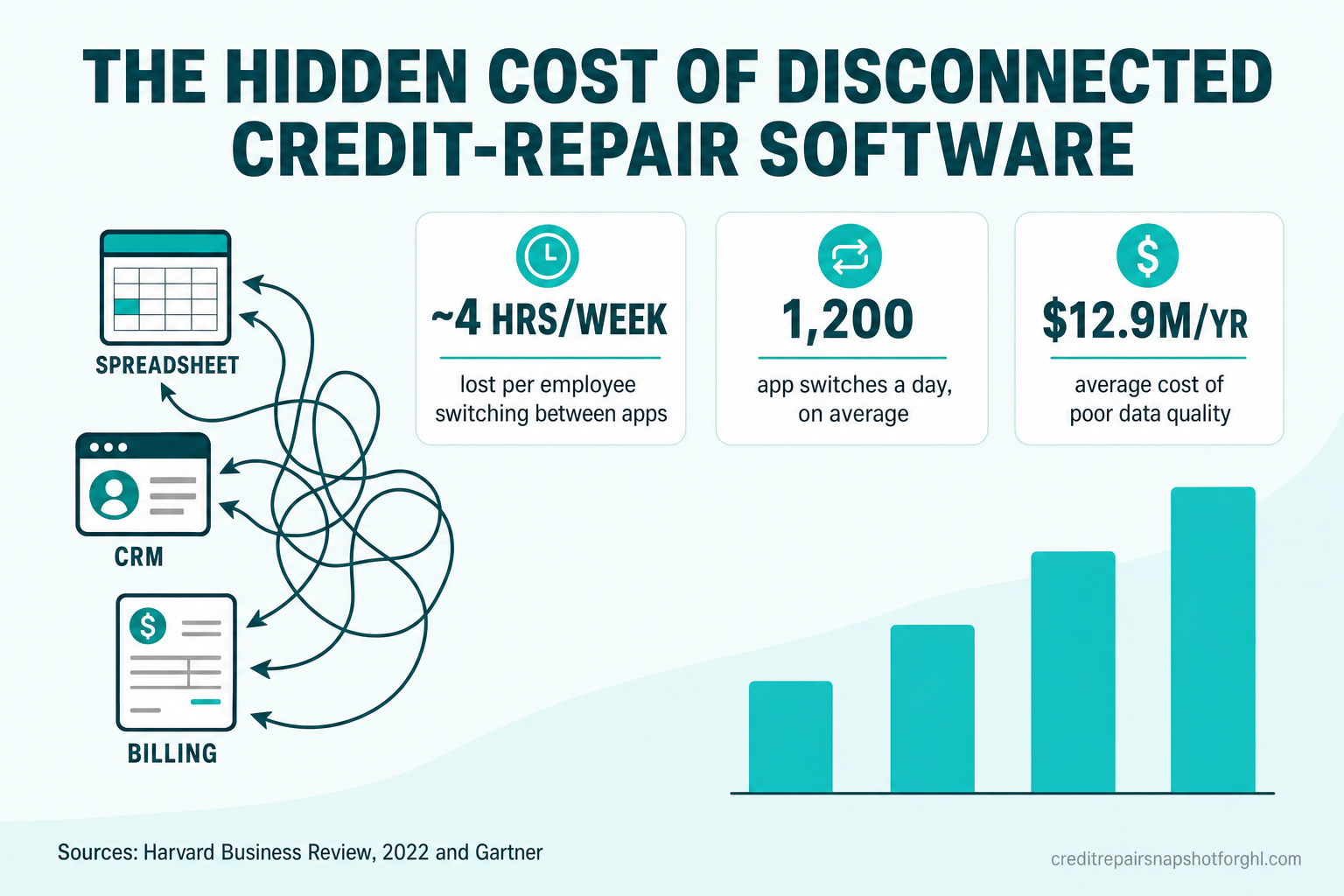
That gap has a measurable cost: knowledge workers lose about four hours a week just reorienting after switching between apps (Harvard Business Review, 2022). Across a two- or three-person credit-repair team, that’s most of a workday every week spent on data entry instead of clients — plus the compliance risk that comes with copying regulated client data by hand. This article breaks down where that time actually goes, why it hits earned-traffic niches like credit repair harder, and the three ways to connect your stack so the software does the reconciling instead of your staff.
Table of contents
- The one-sentence answer
- Why disconnected software hits Seattle credit-repair firms harder
- The five hidden costs of a disconnected credit-repair stack
- What “integrated” actually looks like
- Three ways to connect your stack — and when each pays off
- How to know it’s time to integrate
- Frequently asked questions
- About the author
- Sources
The one-sentence answer
A disconnected software stack costs a small credit-repair firm several hours of manual re-entry every week and creates compliance risk from mismatched records; the fix is integrating your dispute software, CRM, and billing so a change in one system flows to the others automatically — no retyping. Everything below is the evidence and the how.
We sell the operating system, never the outcome. Nothing here promises a score change or a deletion, and neither should your marketing. Integration makes your operations faster and cleaner — it doesn’t change what you’re allowed to claim.
Why disconnected software hits Seattle credit-repair firms harder
Every service business loses time to tool-switching. Credit-repair firms in a market like Seattle feel it more sharply for three specific reasons.
- Your leads are earned, not bought. Google’s advertising policy prohibits credit-repair services from running ads at all (Google Ads policy). You can’t offset a slow, dropped follow-up with more paid traffic — every consult comes from organic search, referrals, or social, so a lead lost to a tool that didn’t sync is money you already spent to earn. (That’s the same reason speed-to-lead and booking systems matter so much in this niche.)
- The data you’re re-keying is regulated. Credit-repair operations run on signed CROA agreements, the required Consumer Credit File Rights disclosure, the three-day cancellation right, and dispute-round records. When that data is copied by hand between systems, every transcription is a chance to enroll someone whose paperwork doesn’t match — a documentation problem you do not want in a CROA audit.
- Seattle labor is expensive. In a high-cost metro, hours your team spends reconciling a spreadsheet against Credit Repair Cloud are among the most expensive hours in your business. Automating them away is a direct margin decision, not a “nice to have.”
The demand that makes each lead valuable is real and large: in 2024 the CFPB logged more than 2.8 million consumer complaints, and about 85% of them were about credit or consumer reporting (CFPB, 2024). The FTC’s landmark study found 1 in 5 consumers had an error on at least one credit report (FTC, 2013). People are actively looking for help — the question is whether your operations can enroll and serve them without dropping the ball. For the full market picture, see our 2026 credit repair industry statistics.
The five hidden costs of a disconnected credit-repair stack
“Disconnected” rarely shows up as a line item. It shows up as five quieter costs.
1. The toggle tax
The most rigorous study of app-switching to date tracked 137 users across three Fortune 500 companies for up to five weeks. Workers toggled between applications roughly 1,200 times each day, and the seconds of reorientation after each switch added up to just under four hours a week — about 9% of their total time at work (Harvard Business Review, 2022).
For a credit-repair firm, that toggling is concrete: open Credit Repair Cloud to check a dispute round, switch to the spreadsheet to update the stage, switch to GoHighLevel to text the client, switch to QuickBooks to confirm the payment cleared. Four apps, one client, several times a day.
2. Re-keyed data becomes wrong data — and a compliance risk
Every manual copy is a chance to fat-finger a name, a Social Security number, a dispute date, or an enrollment stage. At scale, that’s not a rounding error: Gartner estimates poor data quality costs organizations an average of $12.9 million a year (Gartner). Most firms will never see a number that large — but the mechanism is exactly the one hurting you: the same client existing as four slightly different records in four systems, and no one sure which is right.
In credit repair, a mismatched record is worse than an inconvenience. If your CRM says a client signed but your dispute software has the wrong enrollment date, or billing runs on a client whose cancellation window wasn’t logged, you’ve created a CROA and TCPA documentation gap by hand. Our CROA-compliant onboarding checklist exists precisely because that paperwork has to be captured once, cleanly, with an audit trail.
3. Most of the workday becomes “work about work”
When systems don’t sync, people spend their day coordinating the work instead of doing the work. Asana’s Anatomy of Work Index found the average knowledge worker spent only 27% of the day on the skilled work they were hired for; 60% went to “work about work” — status chasing, duplicated effort, and hunting for information across tools (Asana, 2021).
4. Dropped follow-ups from the gaps between systems
When a signed client in your dispute software doesn’t automatically trigger the onboarding sequence in your CRM, someone has to remember to start it. When a payment fails in QuickBooks but your CRM doesn’t know, the dunning text never goes out. Every one of those gaps is a silent client — and silent clients cancel. The whole point of an integrated stack is that a state change (signed, disputed, paid, failed) fires the next touchpoint without a human noticing first, the same logic behind recurring billing without chargebacks.
5. No single source of truth
Ask a disconnected firm “how many active clients are in dispute round two and current on billing?” and you’ll get a shrug and a 20-minute cross-reference. With integrated systems it’s one view. That single source of truth is also what lets you scale past yourself — you can hand work to a VA or a new hire without handing them four logins and a tribal-knowledge map.
What “integrated” actually looks like
Integration doesn’t mean ripping everything out. It means the systems you already use exchange data automatically, so the same client is one record everywhere.
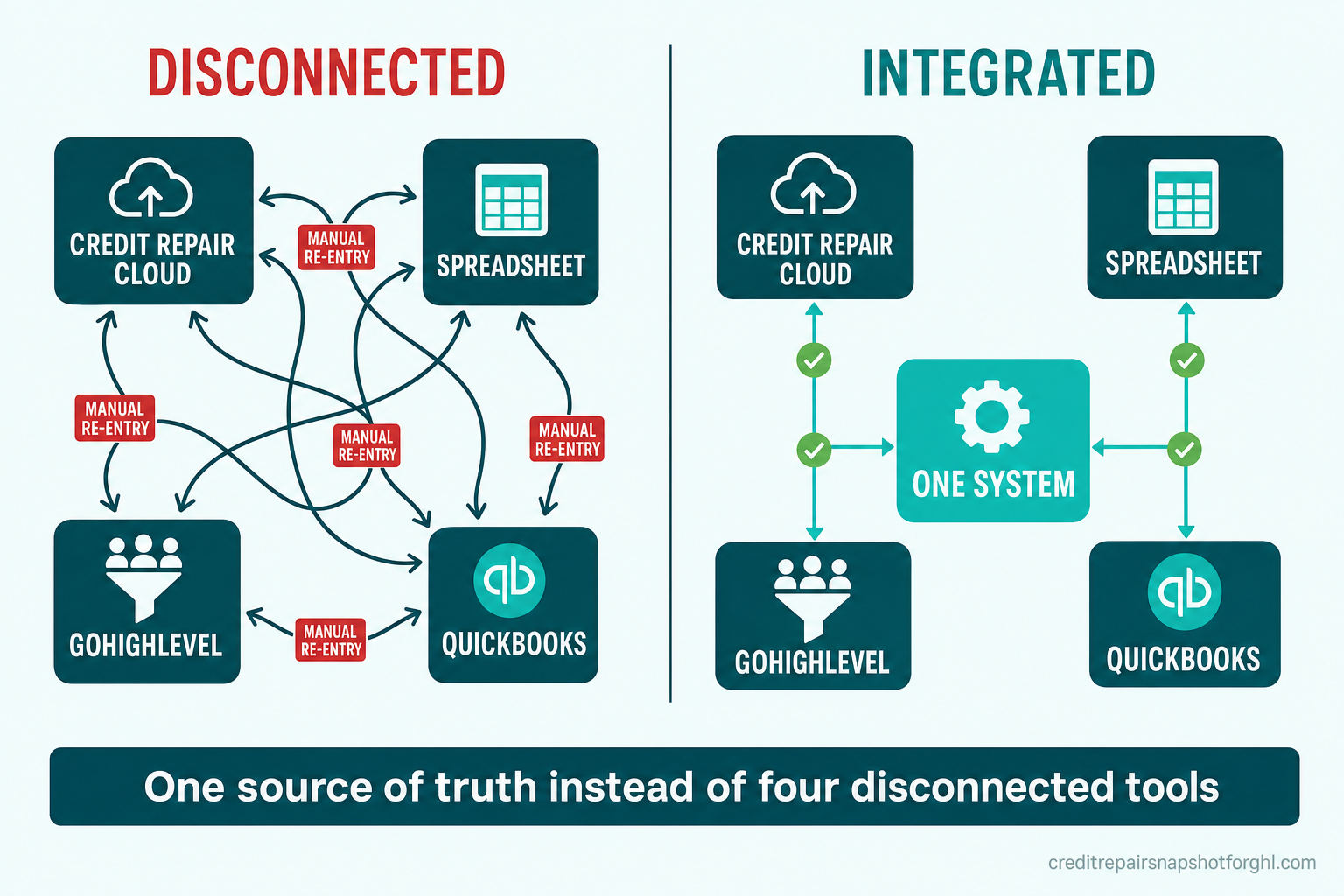
Here’s the difference in practice for a credit-repair firm:
| What happens | Disconnected stack | Integrated stack |
|---|---|---|
| New client signs in dispute software | Someone retypes them into the CRM and spreadsheet | CRM contact + onboarding sequence created automatically |
| Dispute round advances | Manually noted in a spreadsheet later (if at all) | Stage change pushes a progress update to the client |
| Monthly payment fails | Nobody knows until you reconcile QuickBooks | Failed payment triggers a dunning text and task |
| “Who’s active and paid?” | 20-minute cross-reference across four tools | One filtered view, live |
| Compliance record | Scattered; audit means hunting | One timestamped trail per client |
The firms that scale aren’t the ones with the most tools — they’re the ones where the tools stopped needing a human to carry data between them. Your job is disputes and client relationships, not being the API between Credit Repair Cloud and QuickBooks.
For most credit-repair firms, GoHighLevel is the natural hub, because it already runs the CRM, the CRM and workflow automations, the client communication, and the billing. The dispute software stays where it’s best — running disputes — and an integration keeps the two in lockstep. That’s also the split we recommend when firms migrate to GoHighLevel: keep what works, connect it, don’t rebuild it.
Three ways to connect your stack — and when each pays off
There’s no single right answer — it depends on your tools, volume, and budget. Here are the three real options.
1. Native GoHighLevel automations (lowest cost). If most of your operation already lives in GHL, you may only need to consolidate: move onboarding, communication, and billing into GHL workflows so there are fewer external systems to sync in the first place. This is what the Credit Repair Snapshot does out of the box — signed CROA-compliant onboarding, progress updates, recurring billing, and reviews, wired together from day one. Best when your “disconnection” is mostly spreadsheets and manual steps GHL can absorb.
2. Custom integrations between your existing tools (mid-range). When you need to keep a dedicated dispute platform — Credit Repair Cloud, DisputeFox, ScoreCEO, TrackStar, or Client Dispute Manager — a webhook-driven connector can create a GHL contact from every pipeline change and push dispute-round status and payments back into GHL, giving you one unified view without abandoning your dispute software. This is the most common fix for a growing firm, and exactly what our GHL development team builds.
3. Custom software (highest ceiling). When off-the-shelf tools genuinely can’t model how you work — multi-brand operations, a client-facing progress portal, unusual billing, or a system you intend to resell — a purpose-built application becomes worth it. That’s the domain of custom software: a CRM/dispute-management system built for your firm from the ground up. Reserve this for when integration has hit a real ceiling, not before.
How to know it’s time to integrate
You don’t need a study to diagnose this — you need an honest look at last week. Any three of these means the manual glue is now costing more than the fix:
- You (or a staffer) retype the same client into more than one system. The clearest signal. Every duplicate entry is toggle tax and an error waiting to happen.
- Answering “who’s active and paid?” takes more than a minute. No single source of truth.
- Follow-ups depend on someone remembering. Signed-but-not-onboarded clients, failed payments with no dunning, dispute rounds that advance with no client update.
- Your compliance records live in more than one place. CROA and TCPA documentation should be one trail per client, not a scavenger hunt.
- You can’t safely hand operations to a VA. If onboarding a GoHighLevel VA means teaching four disconnected tools and their quirks, the process — not the person — is the bottleneck.
If you checked three or more, the integration will pay for itself in recovered hours and prevented errors faster than almost anything else you could buy. Start by mapping every place a single client’s data currently lives, then decide which of the three paths above fits — or book a call and we’ll map it with you.
Frequently asked questions
How much time do disconnected tools actually cost a credit-repair firm?
More than most owners think. The most rigorous study to date (Harvard Business Review, 2022) found workers toggle between applications roughly 1,200 times a day and lose just under four hours a week reorienting after those switches — about 9% of their work time. For a two- or three-person credit-repair firm re-entering clients across dispute software, a CRM, a spreadsheet, and QuickBooks, that adds up to most of a workday every week spent on data entry instead of clients.
Do I have to move off Credit Repair Cloud or DisputeFox to integrate?
No. Integration means keeping your dispute software where it's best — running disputes — and connecting it to your CRM and billing so data flows automatically. A webhook-driven connector can create a GoHighLevel contact from every pipeline change and push dispute-round status and payments back into GHL, giving you one unified view without abandoning Credit Repair Cloud, DisputeFox, ScoreCEO, TrackStar, or Client Dispute Manager.
Isn't manual data entry between tools 'good enough' for a small firm?
It's the most expensive kind of cheap. Every manual copy is a chance to mismatch a regulated client record — and in credit repair a mismatched enrollment date or an unlogged cancellation window is a CROA or TCPA documentation gap, not just an inconvenience. Gartner estimates poor data quality costs organizations an average of $12.9 million a year; the mechanism (the same client as several slightly different records) is exactly what hurts small firms too.
What's the difference between an integration and custom software?
An integration connects tools you already use (for example, syncing a dispute platform with GoHighLevel and QuickBooks) so they exchange data automatically. Custom software replaces one or more of those tools with an application built specifically for your firm. Integration is the right first step for most firms; custom software is worth it only when off-the-shelf tools genuinely can't model how you operate — multi-brand operations, unusual billing, or a system you plan to resell.
Will integrating my software let me promise faster credit results?
No. Integration makes your operations faster, cleaner, and more compliant — it says nothing about credit outcomes. Your marketing must describe process and effort, never promise a deletion or score increase, and your firm remains the credit-repair organization responsible for CROA compliance. Better systems help you serve and retain clients; they never change what you're allowed to claim.
Where should a Seattle credit-repair firm start?
Map every place a single client's data currently lives — dispute software, CRM, spreadsheet, billing — and count how many times that client is entered by hand. If it's more than once, list the state changes that should fire a next step automatically (signed, disputed, paid, failed). That map is the integration spec. From there, decide between consolidating into GoHighLevel, building custom integrations, or (rarely) custom software.
About the author
Simone Braxton is a GHL Automation Strategist focused on credit-repair operations. She spent eight years running back-office operations for credit-repair firms before moving full-time into GoHighLevel implementation, and she writes about the systems — from compliant onboarding to cross-tool integrations — that decide whether a firm scales or stalls. Simone is a fictional editorial persona used for authorship attribution; her articles are operational guidance, not legal or financial advice.
Related reading
- Migrate Your Credit Repair Business to GoHighLevel (Atlanta): The 2026 Playbook
- Credit Repair Client Portal: Build a Progress-Tracking Portal in GoHighLevel
- Recurring Billing Without Chargebacks for Credit Repair
- CROA-Compliant Client Onboarding Checklist
Sources
- Harvard Business Review — How Much Time and Energy Do We Waste Toggling Between Applications? (2022) — workers toggle ~1,200 times/day and lose ~4 hrs/week (≈9% of work time) reorienting; study of 137 users across three Fortune 500 firms over up to five weeks.
- Asana — Anatomy of Work Index (2021) — 27% of the day on skilled work vs 60% on “work about work”; workers switch between ~10 apps ~25 times a day.
- Gartner — Data Quality — poor data quality costs organizations an average of $12.9M/year.
- Google Ads — Financial products and services policy — credit-repair services are prohibited from advertising.
- CFPB — 2024 Consumer Response Annual Report — 2.8M+ complaints; ~85% about credit/consumer reporting.
- FTC — Study of Credit Report Accuracy (2013) — 1 in 5 consumers had a credit-report error.
Credit Repair Snapshot for GHL is a GoHighLevel automation product. We are not a credit repair organization, law firm, or credit bureau, and we do not dispute items, repair credit, or provide credit, legal, or financial advice. You remain responsible for CROA and TCPA compliance. Results vary; we make no promise that any item will be removed or that any score will improve.